
Local SEO Audit: A Checklist Beyond Your Google Business Profile
Run a local SEO audit in one pass: Business Profile, map pack keywords, geo-grid coverage, location pages, NAP and citations, reviews, and a fix list.
TL;DR
- A local SEO audit is a full diagnostic of why you do or don’t show up for local searches, not just a Google Business Profile tidy-up.
- Check seven layers in order: profile, map pack keywords, geo-grid coverage, website and location pages, NAP and citations, reviews, then the fix list.
- A 100% complete profile can still miss the map pack for a category plus suburb search, so the map checks matter as much as the profile check.
- DataWise covers the profile, Local Pack, GeoGrid and Site Audit layers; citations and NAP are a manual pass because DataWise has no citation scanner.
- Fix blockers first (wrong NAP, wrong category, guideline problems), then map gaps, then site issues, and re-run the same checks monthly.

What is a local SEO audit?
A local SEO audit is a structured check of everything that decides whether a business shows up when people nearby search for what it sells: the Google Business Profile, map pack positions, coverage across the service area, the website and its location pages, business listings on other sites, and reviews. The output is a short, ranked fix list, not a 60-page PDF.
It goes wider than a profile audit because Google’s own explanation of local ranking does. Local results are “mainly based on relevance, distance, and popularity,” and prominence is “also based on info like how many websites link to your business and how many reviews you have” (Google local ranking help). Some of that lives in the profile. A lot of it lives on your website and across the rest of the web. I reckon most “local SEO audits” sold to small businesses stop at the profile because that’s the easy screen to screenshot.
What should a local SEO audit checklist include?
A complete local SEO audit checklist covers seven layers, and each one answers a different question. Run them in this order, because each layer explains the next: there is no point fixing location pages if the profile is suspended, and no point reading a geo-grid if the keyword list is wrong.
| Layer | Question it answers | Where to check |
|---|---|---|
| 1. Business Profile | Is the listing complete, accurate and inside Google’s guidelines? | Google Business Profile, DataWise profile completeness |
| 2. Map pack keywords | Do we show in the pack for the searches that matter? | DataWise Local Pack |
| 3. Geo-grid coverage | Where across the service area do we win or disappear? | DataWise GeoGrid |
| 4. Website and location pages | Can Google crawl, understand and trust the pages the profile points to? | DataWise Site Audit, Search Console |
| 5. NAP and citations | Do the name, address and phone match everywhere that matters? | Manual: Google, Apple, Bing, key directories |
| 6. Reviews | Are rating, volume, recency and replies healthy? | DataWise reviews panel, Google Business Profile |
| 7. Fix list and cadence | What do we fix first, and when do we re-check? | Site Audit Kanban, a dated audit log |
Keep the whole audit in one dated document. The point is to re-run the exact same checks next month and compare, which is the same discipline you need for rank tracking.
How do you audit your Google Business Profile?
Start by confirming the profile is verified, complete and compliant, then check the handful of fields that most often go wrong. Completeness is the quick part. Compliance is where profiles actually get into trouble.
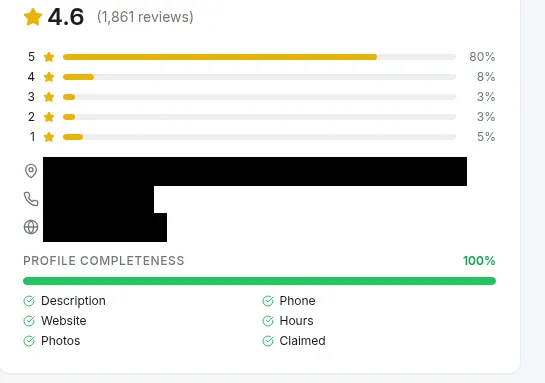
The DataWise profile card above checks six basics: description, phone, website, hours, photos and claimed status. That’s your first pass. Then audit the fields against Google’s guidelines for representing your business, which say your name “should reflect your business’s real-world name,” that you should “choose the fewest number of categories it takes to describe your overall core business,” and that “there should only be one profile per business” (Google Business Profile guidelines). In the audit, check these five things:
- Name: no keywords, city names or taglines added to the real business name.
- Primary category: the most specific category that completes “this business IS a.”
- Address or service area: a real, staffed location, or a hidden address with a service area for businesses that travel to customers.
- Website link: points to the right page (usually the location page, not a generic homepage, for multi-location businesses).
- Duplicates: search the business name and phone number on Google Maps to find old or duplicate listings.
This is an audit, so write down what’s wrong and move on. The how-to for each fix (categories, descriptions, photos, Updates) is already in our Google Business Profile optimization guide, and this post doesn’t repeat it.
Which local keywords should you check in the map pack?
Check a short list of the searches that bring in customers: your brand name, your main category plus city or suburb, and at least one “near me” style query. The audit question is simple: for each one, are you in the pack, and if not, which phrase is the gap?
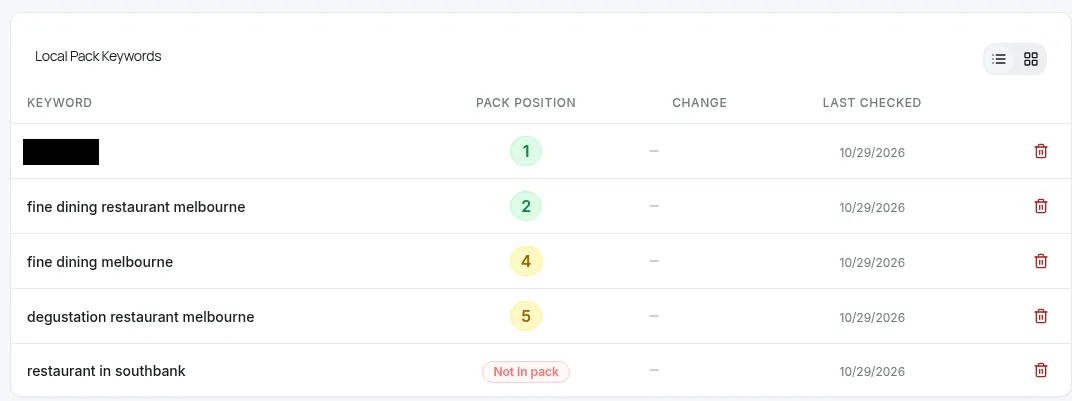
This is the same Southbank fine-dining venue from the GBP guide, checked on 29 October 2026. Its profile scored 100% complete, yet “restaurant in southbank” came back “Not in pack.” That one row is why a profile audit alone is not a local SEO audit. A complete profile told us nothing about whether Google sees the venue as relevant for a broad category plus suburb search.
Record three things per keyword: pack position, the check date, and where the search was run from. A pack check is a sample from one location, so treat it as a starting point and confirm the pattern on a grid. Mind you, a “Not in pack” on a phrase that doesn’t match what you sell is fine. Only chase the gaps that match real services.
How do you check geo-grid coverage across your service area?
Run a geo-grid scan for your most important category keyword, centered on the business, with a grid size and radius that match how far customers travel. Then read three numbers: how many points find you, how many put you in the top 3, and your average position.
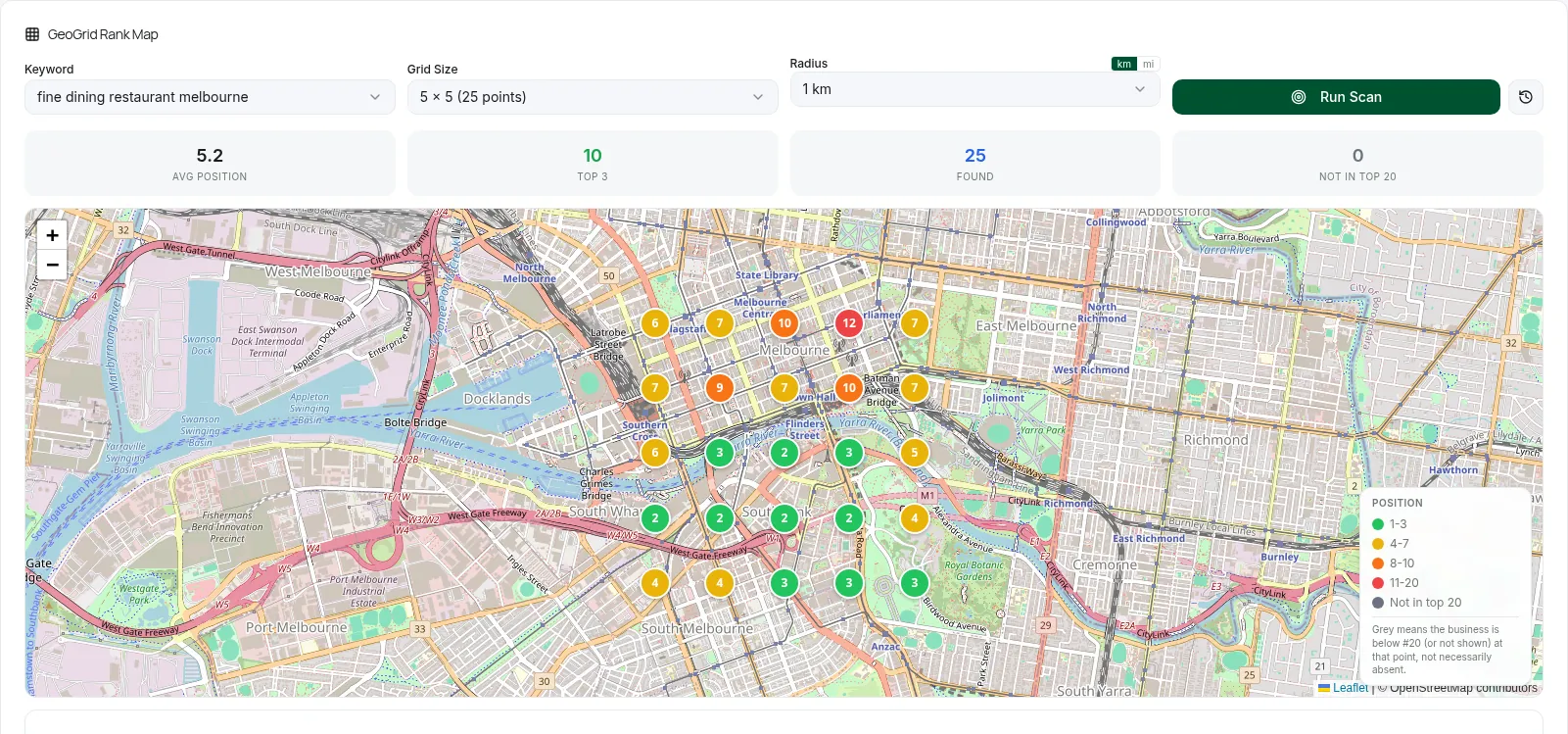
For the same venue, “fine dining restaurant melbourne” on a 5x5 grid at 1 km found the listing at all 25 points but put it in the top 3 at only 10 of them, with an average position of 5.2. The green sits near the venue in the south; the north of the grid is yellow, orange and red. Found everywhere, winning in half the map. That’s a coverage problem you would never spot from one search at your desk.
In the audit, save the scan settings with the result (keyword, grid size, radius, center, date) so next month’s scan is comparable. If you want the full method for picking grid size and reading coverage over time, the local rank tracking guide covers it step by step.
How do you audit your website and location pages for local SEO?
Audit the pages your profile and local searches land on: the homepage or location page linked from the profile, plus one page per core service. Check that Google can crawl and index them, that each one clearly says what you do and where, that the business details match the profile, and that the page loads fast on a phone.
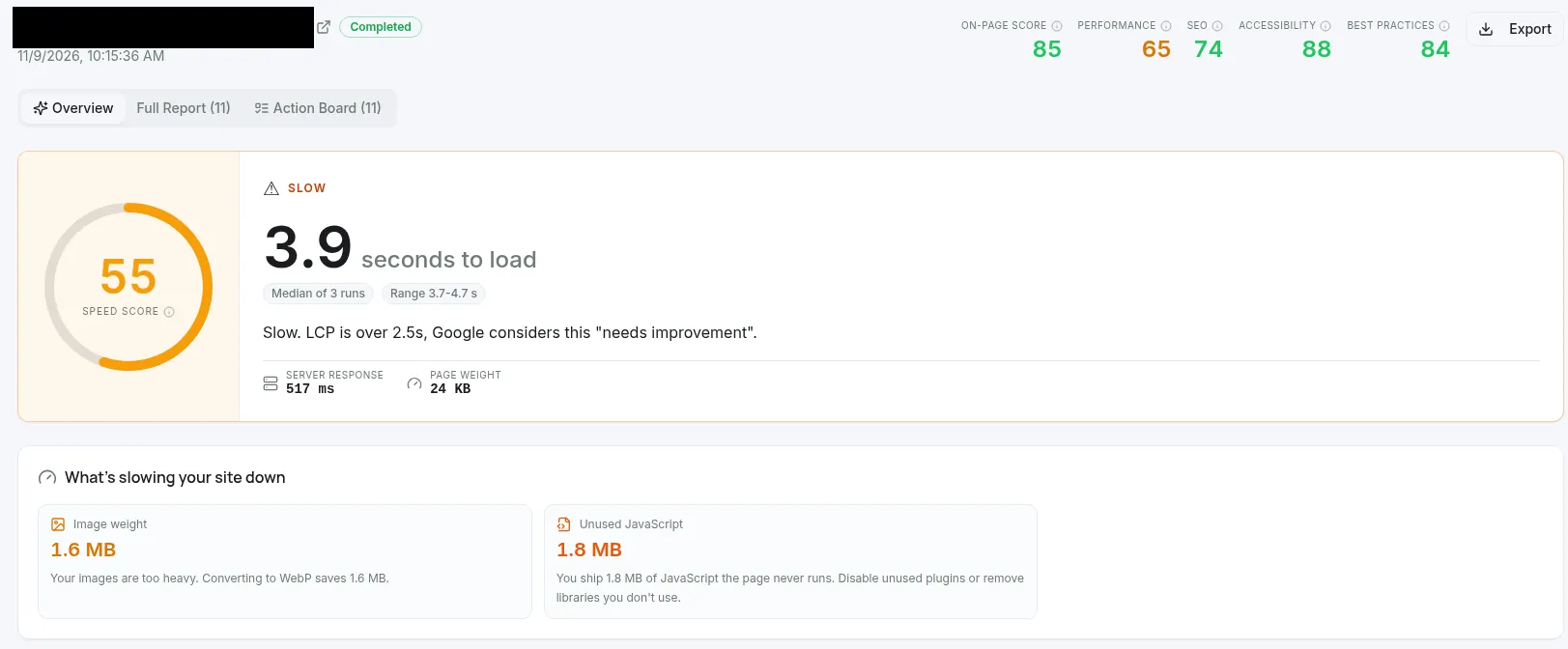
That’s a real Site Audit run on the homepage of a local dog training business on 9 November 2026 (domain redacted). It scored 55 for speed and took 3.9 seconds to load, the median of three runs that ranged from 3.7 to 4.7 seconds. The tool flags it as slow because LCP is over 2.5 seconds, which Google treats as “needs improvement.” The two culprits it names are 1.6 MB of image weight (it estimates converting to WebP saves 1.6 MB) and 1.8 MB of unused JavaScript.
The on-site layer matters more than most profile-first checklists admit. In Whitespark’s 2026 expert survey, “Dedicated Page for Each Service” ranked as the number 1 factor for local organic results, and “HTML NAP Matching GBP NAP” ranked 15th for the local pack (Whitespark Local Search Ranking Factors 2026). That report is a survey of 47 experts, not a Google statement, so read it as informed opinion.
Here’s the on-site pass, and where DataWise Site Audit fits:
| Check | What good looks like | Tool |
|---|---|---|
| Crawl and index | Location and service pages return 200, are in the sitemap, not noindexed, with a correct canonical | Site Audit indexation check |
| Titles and headings | One H1 per page, service plus place in the title, no missing meta descriptions | Site Audit on-page issues |
| Speed | LCP within 2.5 seconds, INP under 200 ms, CLS under 0.1 | Site Audit Core Web Vitals |
| Business details | Name, address and phone in plain text match the profile exactly | Manual check |
| Local content | Real local detail per page (areas served, parking, landmarks), not a city name swapped into a template | Manual read |
| Structured data | LocalBusiness markup with the same name, address and phone | Schema checker |
The speed targets come from Google’s Core Web Vitals guidance, which says to “strive to have LCP occur within the first 2.5 seconds,” an “INP of less than 200 milliseconds,” and “a CLS score of less than 0.1” (Google Core Web Vitals). For markup, Google’s LocalBusiness documentation lists name and address as required and says to “use the most specific LocalBusiness sub-type possible” (Google LocalBusiness structured data). Run your pages through the DataWise schema checker to confirm each location page carries the right type rather than copying one block everywhere.
How do you check NAP consistency and local citations?
NAP stands for name, address and phone number. A NAP consistency check confirms those three details are identical on your website, your Google Business Profile, the other big map platforms, and the directories that matter in your industry. Local citations are any online mentions of those details, usually on directory and listing sites.
DataWise has no citation scanner, so this layer is manual (or done with a dedicated third-party citation tool). It’s still worth doing, because Google says profile information is compiled from sources including “crawled web content,” “licensed data from third parties,” and users who contribute facts like addresses and phone numbers (how Google sources business information). Wrong details elsewhere can feed back into what Google shows.
How much weight does it carry? Less than the profile and reviews, by most accounts. In the same Whitespark survey, consistency on the primary search engines (Google Maps, Bing Maps, Apple Maps) ranked 28th for the local pack, consistency on key sites like Yelp and Yellowpages ranked 63rd, and consistency on data aggregators ranked 85th. That ordering tells you where to spend your time.
Run it like this:
- Write the canonical NAP once. The exact business name, address format, suite number and main phone number, copied from the verified profile.
- Check the big three first. Google Business Profile, Apple Business Connect and Bing Places. These are the three platforms the Whitespark survey groups as primary search engines.
- Check your website. Footer, contact page, location pages and the LocalBusiness markup.
- Search for old details. Search your old address and old phone number in quotes. Every result showing them is a listing to update or remove.
- Check the top directories for your trade. Search “[your category] [your city]” and note which directory sites rank. Those are the citations real customers see.
- Log every fix with a date. Note which listings you changed, so you can match any later movement against real dates.
Watch for tracking phone numbers. A call-tracking number on one directory and the main number on another is a mismatch you created yourself.
How do you audit your Google reviews?
Audit four things: average rating, total review count, how recent the latest reviews are, and how many reviews (especially low-star ones) are still unanswered. Then read the newest dozen reviews for repeat complaints, because those are operational fixes, not SEO fixes.
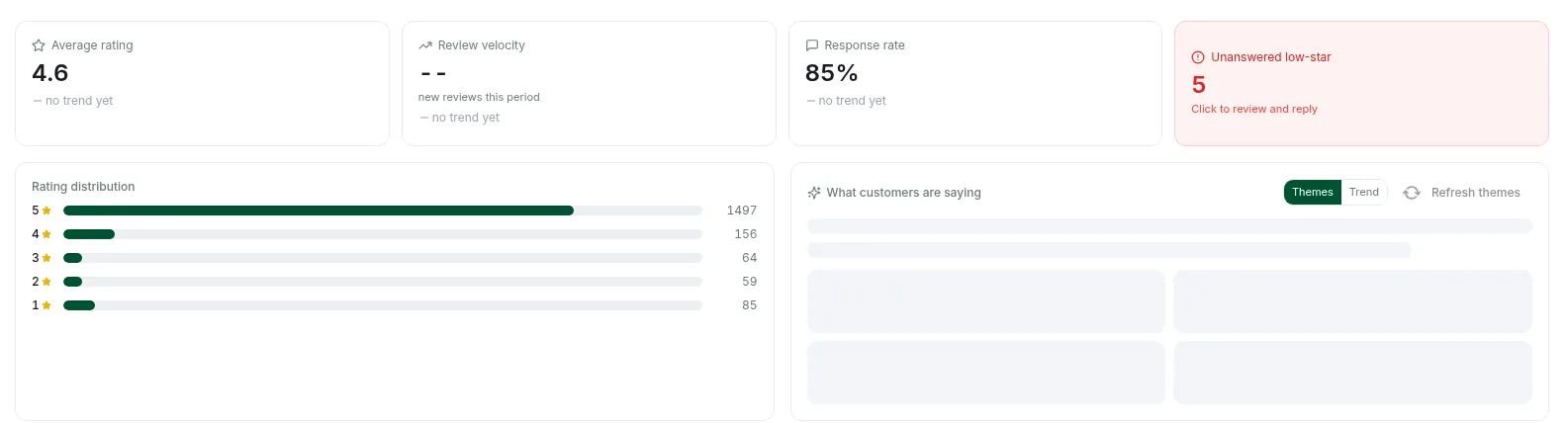
For the same venue the reviews panel showed a 4.6 average, an 85% response rate, and 5 unanswered low-star reviews flagged in red. A strong profile, with a clear, small to-do: answer those five. Google says that replying to reviews “shows that you value their feedback” and that “more reviews and positive ratings can help your business’s local ranking” (same Google local ranking help page). Whitespark’s experts ranked “Recency of Reviews” 11th for the local pack, so a profile with plenty of old reviews and nothing new is also an audit finding.
For reply wording, including fake and abusive reviews, use our guide on how to respond to Google reviews. In the audit, just count, date and flag.
How do you turn audit findings into a fix list?
Sort every finding into three buckets and work them in order: blockers, map gaps, then site improvements. Blockers are anything that can suspend the profile or send customers to the wrong place: keyword-stuffed names, wrong categories, wrong phone numbers, duplicate listings. Map gaps are keywords you should win but don’t, or grid areas where you vanish. Site improvements are the crawl, speed, page and markup issues.
| Priority | Examples | Why first |
|---|---|---|
| 1. Blockers | Name breaks guidelines, wrong NAP on Google, Apple or Bing, duplicate profile | Risk of suspension or lost calls |
| 2. Map gaps | Category plus suburb not in pack, weak half of the geo-grid | Direct loss of local visibility |
| 3. Site fixes | No dedicated service page, slow location page, missing or wrong LocalBusiness markup | Supports relevance and prominence over time |
| 4. Reviews hygiene | Unanswered low-star reviews, no recent reviews | Ongoing trust and conversion |
For the third bucket, Site Audit can send flagged issues to a Kanban board with To do, In progress and Done columns, so the audit becomes a backlog instead of a document.
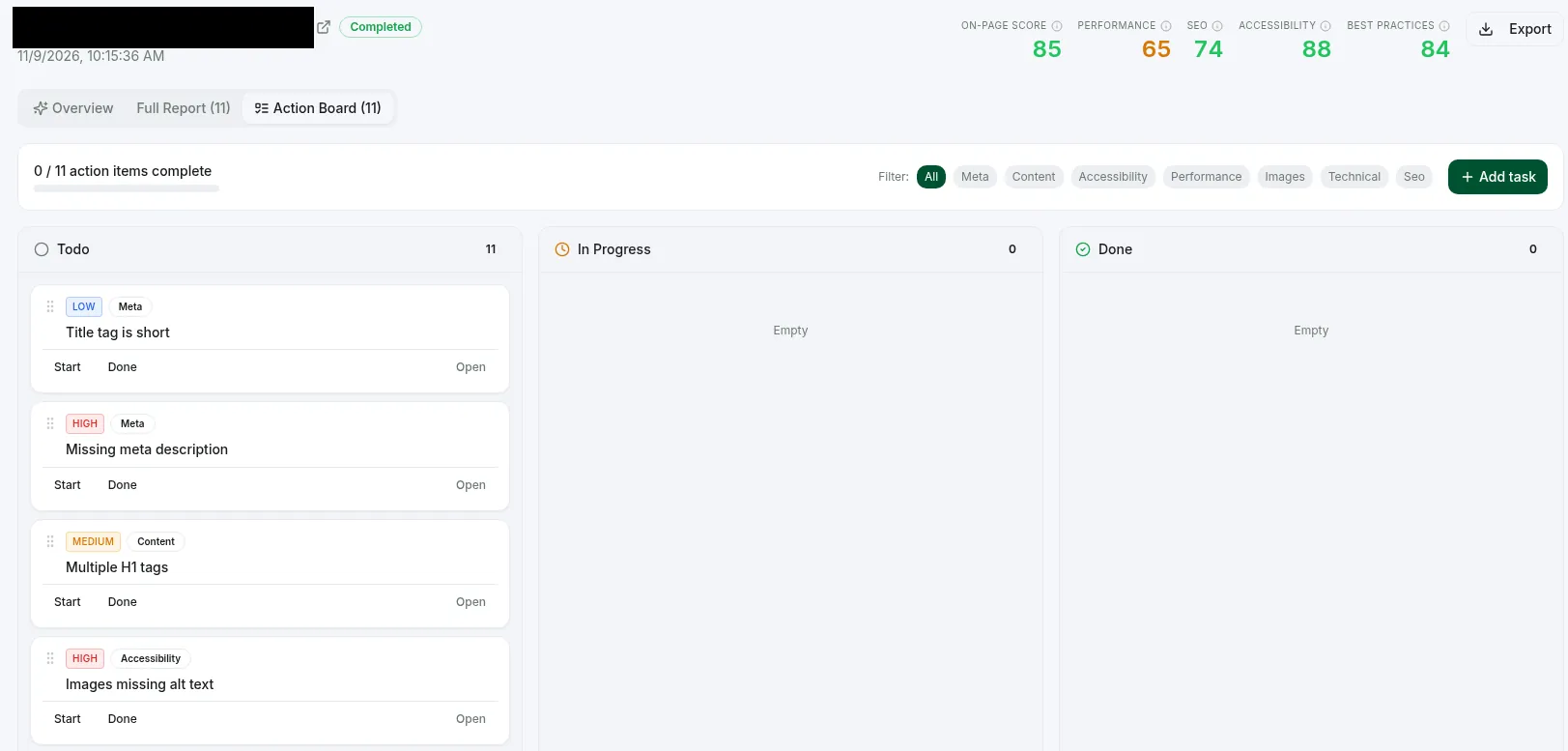
On the same dog training audit, the board opened with 11 items in Todo and nothing in progress or done: 4 high, 4 medium and 3 low priority. The first cards were a short title tag, a missing meta description, multiple H1 tags and images missing alt text. Start with the high-priority cards and move them across as they ship. Trust work (who runs the business, real photos, real contact details) overlaps with what we cover in E-E-A-T explained, so link the two jobs rather than doing them twice.
Then set the cadence. Re-run the same keywords on the same grid settings monthly, re-check the profile after any edit, and review the profile’s Performance report for calls, direction requests and website clicks over the same months. Pack positions and engagement are different measurements, so log both next to your fix dates.
Next step: run layers 1 to 3 this week (profile, five pack keywords, one geo-grid scan) and save them as your baseline. DataWise is included with the paid AI Ranking community membership, from $27/month.
FAQ
How much does a local SEO audit cost?
It ranges from your own time, if you run the checks yourself, to a paid agency engagement priced by the number of locations and how deep the website review goes. Ask any provider which layers they cover: a quote that only reviews the Business Profile is a profile audit, not a local SEO audit. Ask to see the checks re-run after the fixes, too.
Can ChatGPT do a local SEO audit?
Not on its own. A chat assistant can’t see the map pack from your customers’ locations or crawl your site unless it’s connected to real data. Connected to a tool that supplies pack positions, geo-grid scans and crawl results, it can summarize findings and draft a fix list, but you still verify every number against the source.
What is the difference between SEO and local SEO?
Traditional SEO targets the regular organic results, where your pages compete on relevance and authority wherever the searcher is. Local SEO targets searches with local intent, where Google also weighs distance and shows the map pack alongside organic results. Most local businesses need both, because the website supports the profile.
Can I do a local SEO audit myself?
Yes, if you can spare a few focused hours and follow the layers in order. The profile, review and NAP checks need no special skills. The geo-grid and crawl layers need a tool, and the hard part is consistency: same keywords, same grid settings and same notes every time you re-run it.
How long does it take to see results after a local SEO audit?
There is no fixed timeline. Website changes have to be recrawled first, and Google notes it “may take several days after publishing a page for Google to find and crawl it” (Google LocalBusiness structured data). Compare full months of pack checks and grid scans before you decide whether a fix worked.

Nicolas Gorrono
Founder of DataWise SEO and the AI Ranking community. Writing about SEO, AI search, and data-driven optimization.
Put these insights into action
Join the AI Ranking community to get unlimited DataWise access, included with your membership. 7-day risk-free trial.
Join AI Ranking