
Google Business Profile Optimization: What Actually Gets You in the Map Pack
Google Business Profile optimization from Google's rules and fresh map checks: why a 100% complete profile isn't enough, and what to fix and track next.
TL;DR
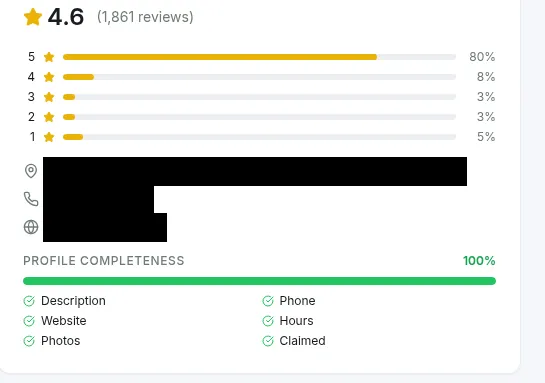
- A 100% complete profile is table stakes, not visibility: two venues we tracked both scored 100%, yet one took 21 of 25 map points in the top 3 and the other 10.
- Google ranks local results on relevance, distance, and prominence, and you can’t pay for a better spot.
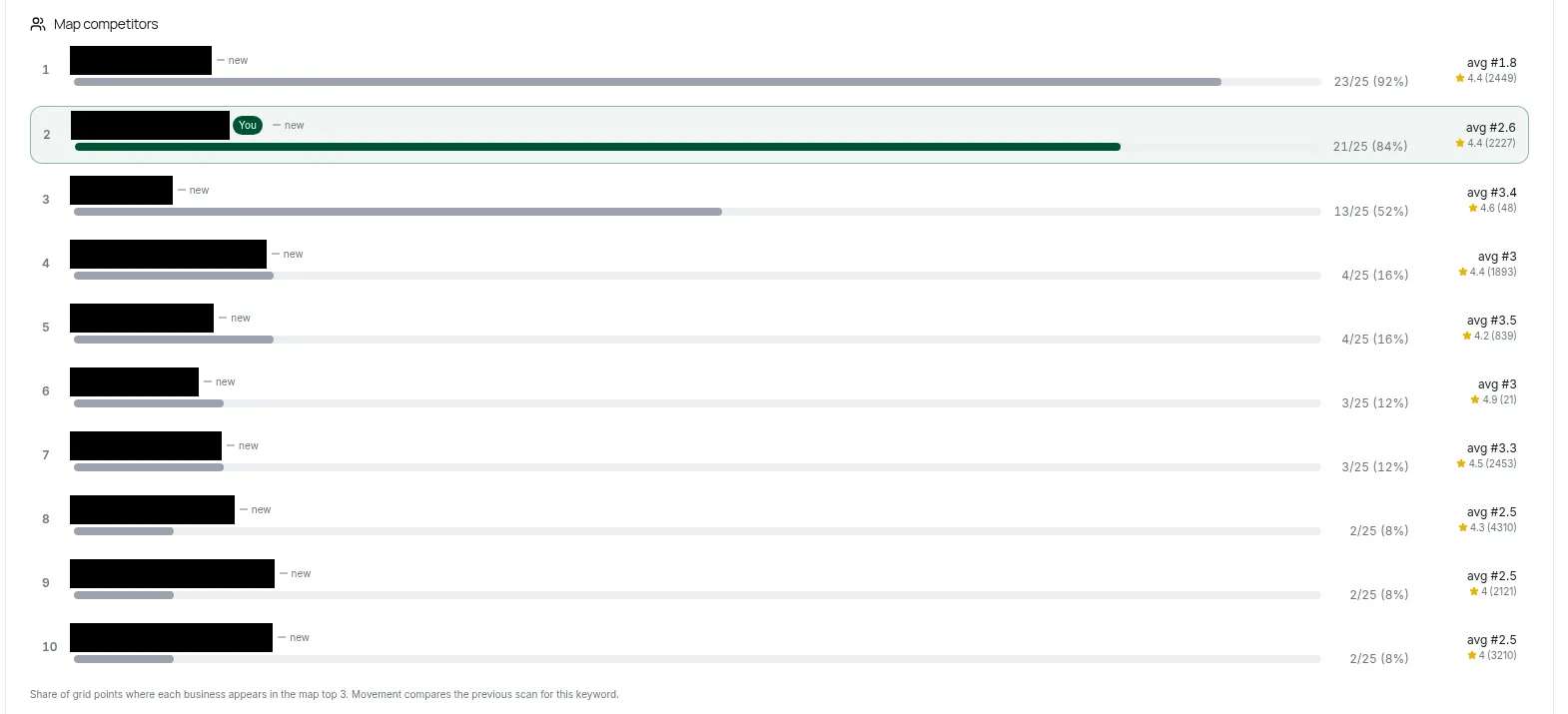
- Review count alone doesn’t win the map: a rival with 48 reviews sat in the top 3 at 13 of 25 points next to a pub with 2,227.
- Treat the profile like another social channel: keep posting fresh photos, and reply to every review.
- Track brand, category plus city, and “near me” searches on a geo-grid; avoid name keywords and duplicate profiles that get you suspended.

What is Google Business Profile optimization?
Most owners think optimization means filling in every field until the profile looks finished. That gets you in the game, but it doesn’t decide where you show on the map. Google Business Profile optimization is the work of making your listing on Search and Maps complete, accurate, and inside Google’s rules, then making it the most relevant and best-known match for the searches you care about, and measuring where you actually appear.
Everything below ties back to Google’s own documentation or to map checks we ran in DataWise on 29 October 2026. Where a popular tactic isn’t confirmed as a ranking factor, you’ll see that called out.
How does Google decide which businesses show in local results?
Google ranks local results on three things: relevance (how well your profile matches the search), distance (how far you are from the searcher), and prominence (how well known you are, including “how many websites link to your business and how many reviews you have”) (Google’s local ranking help page). You can’t change your distance from a searcher, so your work goes into relevance and prominence. You also can’t buy your way up, because “there’s no way to request or pay for a better local ranking,” and ads sit above the map results without changing your organic spot.
This table maps each factor to what you control and where you can see it move.
| Google factor | What you control | Confirmed by Google? | Where DataWise shows it |
|---|---|---|---|
| Relevance | Primary and secondary categories, services, description, what reviews talk about | Yes, categories “affect your local ranking” | Pack position per keyword, grid coverage per keyword |
| Distance | Your real address or service area (not a ranking lever) | Yes | Geo-grid: positions get worse as points move away from you |
| Prominence | Reviews and rating, links to your site, how well known you are | Yes, reviews and links are named | Rating, review count, response rate, competitor review counts in the grid |
| Completeness and verification | Claim, verify, fill every field | ”More likely to show up,” not a named factor | Profile completeness card (6 checks) |
| Posts and photo volume | Keep the profile current | Not listed as a ranking factor | Not measured |
Because links feed prominence, a backlink gap analysis against nearby competitors is a sensible next project once the profile is sorted.
Does a 100% complete profile get you into the map pack?
No: complete is not the same as visible. On 29 October 2026 we tracked two Southbank (Melbourne) venues in the DataWise Local Pack tool, and both profiles scored 100% on completeness. On a 5x5 geo-grid at 1 km, the Irish pub showed in the map top 3 at 21 of 25 points, while the fine-dining venue managed 10 of 25 for its own category search, and that gap has nothing to do with the completeness score.
| Profile (anonymized) | Completeness | Rating / reviews | Keyword scanned | Grid | Top 3 points | Avg grid position |
|---|---|---|---|---|---|---|
| Southbank Irish pub | 100% | 4.4 / 2,227 | irish pub | 5x5, 1 km | 21 of 25 | 2.6 |
| Southbank fine-dining venue | 100% | 4.6 / 1,861 | fine dining restaurant melbourne | 5x5, 1 km | 10 of 25 | 5.2 |
| Unclaimed US handyman (older check, April 2026) | 67% | 4.9 / 37 | handyman search | 7x7, 3 km | Found at 1 of 49 | Not comparable |
Different keywords, so read the rows as patterns, not a contest. Today’s numbers are a fresh snapshot, and we’re not claiming to know what moved either venue in the past.
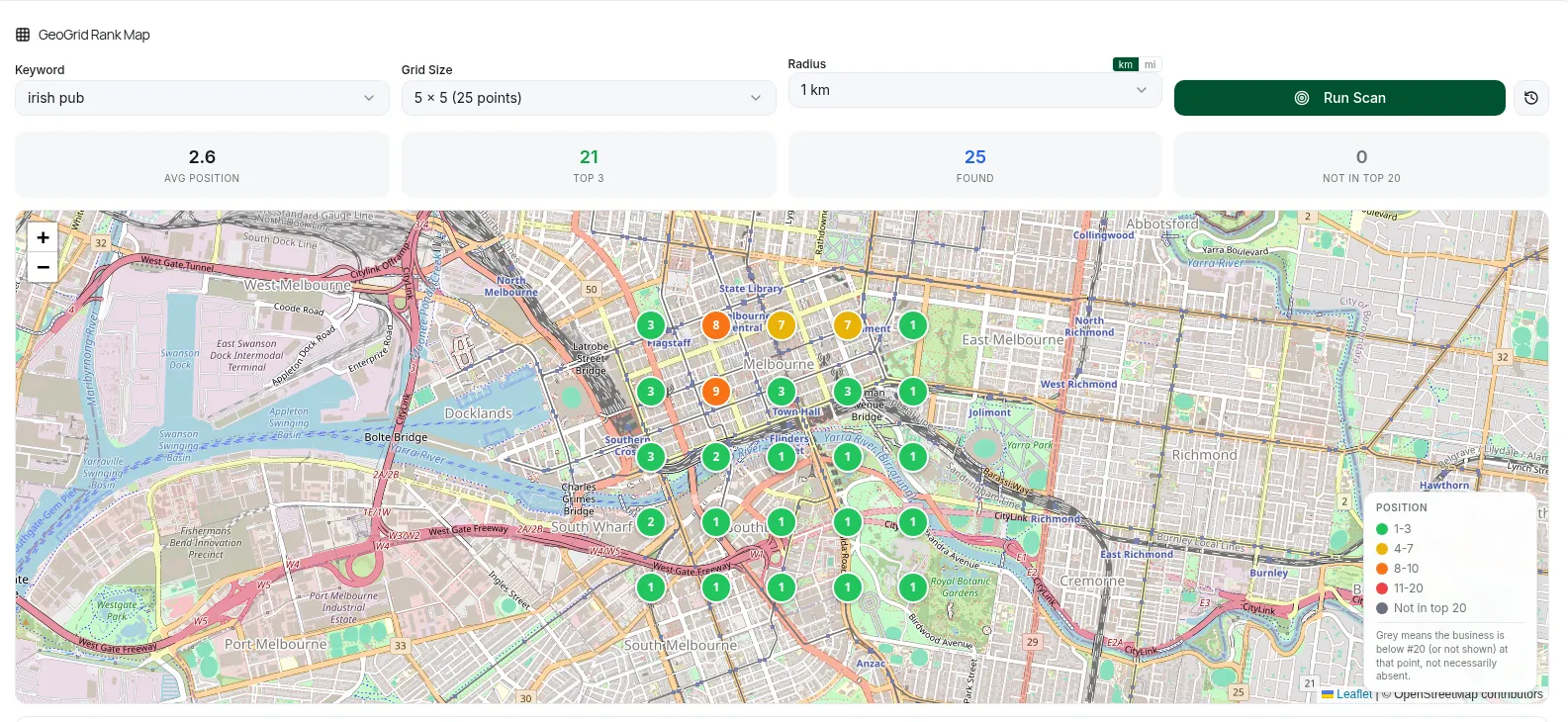
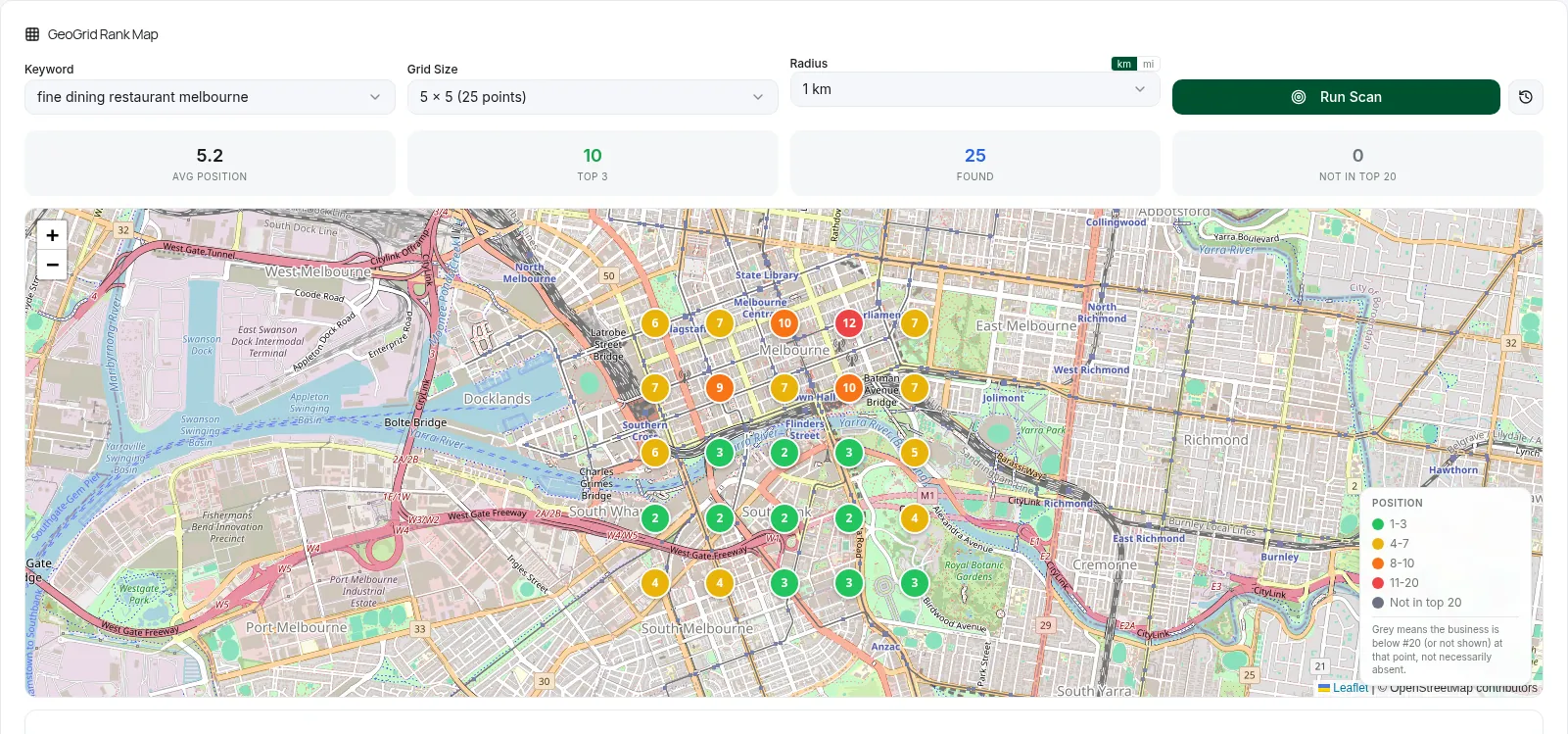
The fine-dining venue was found at every point, mind you. It just ranked fourth on share of top-3 points behind three rivals, so “found” and “in the pack” are two different numbers.
Which Google Business Profile fields should you fix first?
Claim and verify the profile first, because verified businesses are “more likely to show up in search results” and your photos stay invisible until you do (Google, Google photo help). Then fix the core fields: your real-world name with no taglines or locations added, your street address if customers visit you (or a service area of up to 20 cities or postal codes within about 2 hours of driving if you go to them, per Google’s service area help), regular and holiday hours, and a local phone number “under the direct control of the business” (Google’s representation guidelines). The reason is simple: businesses with “complete and accurate info are more likely to show up in local search results,” so this is the entry ticket (Google).
The unclaimed handyman in the table above is the trap: 4.9 stars, no description, and an owner who can’t even reply to reviews. One exception: hotels, schools, and appointment-only businesses shouldn’t list hours at all, according to the same guidelines.
How do you choose the right Google Business Profile categories?
Pick the single most specific primary category that finishes the sentence “This business IS a,” such as “Nail salon” rather than “Salon,” because “the categories you select affect your local ranking” (Google category help). Add secondary categories only for real departments or core services: Google’s 2026 playbook allows “up to 10 categories in total: one primary and nine secondary” (GBP Best Practices Playbook 2026, PDF), while the guidelines say “use as few categories as possible” and never “solely as keywords” (Google’s guidelines). Plan category edits for a quiet week, because changing one can trigger a new verification request.
To see what wins in your market, search your main service plus your city and read the category label under each map result. Only switch if that category honestly describes you.
What should go in your business description, services, and products?
Your description should say in plain language what you offer, who you serve, and what makes you different, with no links, prices, or promotions, because the guidelines ban all three in that field (Google’s guidelines). List each real service with a one-line description, using the editor’s suggestions plus custom services with no prices or phone numbers in the name, since a matching service “may be highlighted on your profile” when someone searches for it (Google services help). Eligible retail stores can also add in-store products, which “might show in local search results” (Google).
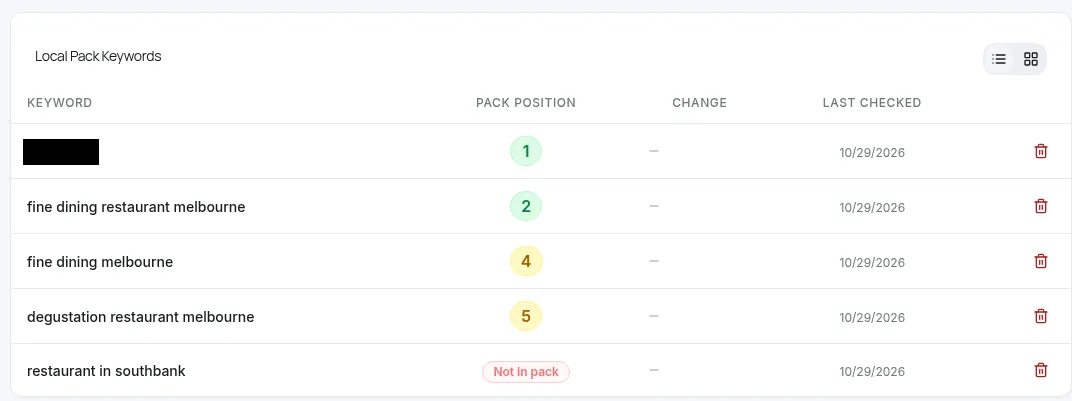
This is relevance work. The fine-dining venue ranks for fine dining searches but isn’t in the pack for the broad “restaurant in southbank,” and the small business keyword research guide shows how to find the phrases people really use.
Should you treat Google Business Profile like a social media profile?
Yes: for a local business, treat Google Business Profile like another social channel you actually show up for. The mechanics are different from Instagram or Facebook, but the habit is the same: keep it updated with fresh photos and posts, and interact by responding to every review. Customers land on your listing the way they land on a feed, and a stale profile with unanswered comments looks abandoned, mind you.
There’s no required number of photos or posts. Start with a logo, a cover photo, an exterior shot so people “recognize your business when they visit,” and real photos of your products or work, as JPG or PNG between 10 KB and 5 MB at about 720 by 720 pixels (Google photo help). Then keep adding: a new dish, a finished job, a behind-the-counter shot. Posts come as Updates, Offers, or Events and archive after 6 months unless you set a date range (Google posts help). Google’s local ranking page doesn’t list posts as a ranking factor, so you’re not chasing an algorithm trick; you’re keeping the profile current for the people who open it.
Google’s playbook cites “5x more views for regularly updated Business Profiles” from its own internal data (GBP Best Practices Playbook 2026, PDF). Don’t lose sleep on a perfect posting calendar. A simple weekly habit (a few photos, one short post, and replies to every new review) beats a burst you abandon. The review replies are the “comments” on this channel: Google recommends short, specific, non-promotional responses (Google review tips), and unanswered low-star reviews are the ones that make you look like you’re not listening.
Do more Google reviews mean a higher local ranking?
More reviews help, but count alone doesn’t buy the map. Google says “more reviews and positive ratings can help your business’s local ranking” (Google), yet on the Irish pub’s grid a rival with just 48 reviews sat in the top 3 at 13 of 25 points, and a place with 4,310 reviews made it at only 2. Relevance and distance still decide a lot, which is exactly what Google’s three factors predict.
| Business on the “irish pub” grid | Top 3 points (of 25) | Avg position | Rating | Reviews |
|---|---|---|---|---|
| Grid leader | 23 | 1.8 | 4.4 | 2,449 |
| Southbank Irish pub (tracked venue) | 21 | 2.6 | 4.4 | 2,227 |
| Rival with 48 reviews | 13 | 3.4 | 4.6 | 48 |
| Rival with 21 reviews | 3 | 3.0 | 4.9 | 21 |
| Rival with 4,310 reviews | 2 | 2.5 | 4.3 | 4,310 |
So keep collecting reviews, but if a small rival beats you near its door, check its category and location before you chase more stars.
How do you get more Google reviews without breaking the rules?
Ask every customer the same neutral way, with a review link or QR code, and never offer anything in return, because incentives such as discounts count as “fake & misleading content” that “is strictly prohibited” (Google review tips). Don’t gate reviews either: merchants may not “selectively solicit positive reviews,” pressure customers on the premises, or set staff review quotas (Maps user contributed content policy). In the US, the FTC rule in force since October 21, 2024 adds legal risk by banning fake reviews and incentives “conditioned on the writing of consumer reviews expressing a particular sentiment” (FTC announcement, FTC rule Q&A).
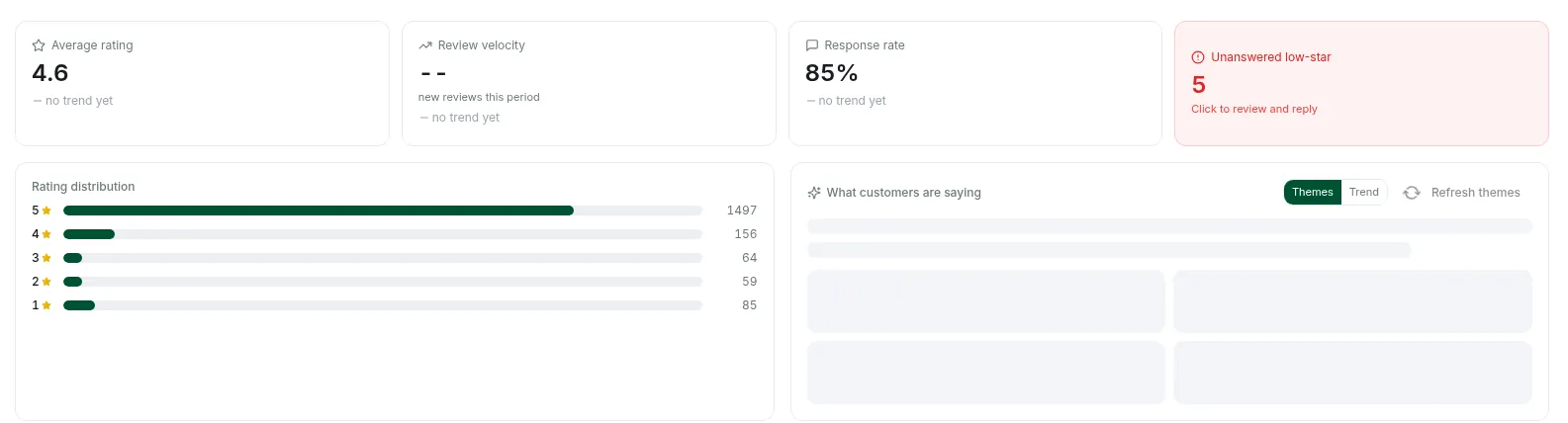
That weekly reply habit from the social tip above is the bit most owners skip. On 29 October the fine-dining venue had an 85% response rate with 5 unanswered low-star reviews, and the pub sat at 46% with 6, so check your newest 1 to 3 star reviews every week and clear them.
What mistakes get a Google Business Profile suspended?
Profiles usually get suspended for tactics that look like optimization but break the guidelines. The big three are keywords or locations in the business name, a virtual office or coworking desk listed as your address, and more than one profile per location (Google’s guidelines). A suspended profile drops out of the places your customers look, so no keyword in your name is worth it.
| Tactic | Why it looks like optimization | Google’s rule |
|---|---|---|
| ”Smith Plumbing Austin Emergency 24/7” as the name | Exact-match keywords in the most visible field | Extra keywords “could result in the suspension of your Business Profile” |
| Virtual office or coworking desk | A pin closer to the busy part of town | Not eligible without signage, staff, and customer hours |
| Second profile for the same location | Twice the shelf space | No “more than one page for each location of your business” |
| Home address shown on a service-area business | Looks more local | Remove the address if you don’t serve customers there (service area help) |
Read the relevant part of the guidelines before any big change. It takes five minutes and saves heaps of pain.
Which keywords should you track for local results?
Track a mix: your brand name, your category plus city or suburb, and at least one “near me” search, because each tells you something different. Brand searches show whether Google knows you exist, category searches show relevance against rivals, and “near me” searches show the distance effect. The biggest-volume terms are usually the hardest, and that’s where you learn the most.
| Keyword type | Example from our checks | AU monthly volume | Pack position on 29 Oct 2026 | What it tells you |
|---|---|---|---|---|
| Brand | Branded search for each venue | Not shown | #1 for both venues | Google can match you by name |
| Category plus suburb | irish pub southbank | 320 | #1 (pub) | Relevance close to home |
| Category plus city | fine dining restaurant melbourne | 2,400 | #2 (fine dining) | Relevance against city-wide rivals |
| Category plus city | fine dining melbourne | 9,900 | #4 (fine dining) | Small wording changes move you |
| Near me | irish pub near me | 18,100 | #1 (pub) | Distance plus relevance |
| Broad category plus suburb | restaurant in southbank | 33,100 | Not in pack (fine dining) | Too broad for a niche profile |
Volumes are DataWise keyword metrics for Australia, checked 29 October 2026. They’re estimates, never a source of truth.
How do you measure whether Google Business Profile optimization is working?
Use two separate sources: the Performance report in your profile for views, calls, directions, and website clicks (Google performance help), and repeated local pack checks plus geo-grid scans for your key searches. Calls are counted as taps on the call button, not completed calls, and the searches metric updates monthly with up to 5 days of delay, so compare full months and log the date of every change. Then re-run the same keywords on the same grid size and radius, because a single check “should not be treated as your position for an entire city,” as the Local Pack tool in DataWise rank tracking puts it.
Otherwise you’re guessing. If you work in an AI assistant, the DataWise MCP server can review a Local Pack project’s profile completeness, rankings, reviews, and latest geo-grid scan. AI answers are a separate check: AI visibility tracking looks at your website, not your map listing.
Next step: a complete profile gets you in the game, and relevance plus proximity decide where you show. Add your brand, two category plus city searches, and one “near me” search to the Local Pack tool in rank tracking, run one geo-grid, and keep that as your baseline. DataWise is included with the paid AI Ranking community membership, from $27/month (pricing).
FAQ
Is Google My Business the same as Google Business Profile?
Yes: Google announced in November 2021 that “Google My Business” was being renamed “Google Business Profile,” and that the old web dashboard would become “Business Profile Manager” for larger businesses with multiple locations (Google). Small businesses now manage their profiles directly in Google Search and Maps.
Do I need an LLC to get a Google Business Profile?
Eligibility is based on having a physical location customers can visit or traveling to customers where they are, and the guidelines we checked don’t list an LLC requirement (Google’s guidelines). Legal terms like LLC, LTD, or INC should only appear in your profile name if your real-world branding consistently uses them and you can show proof such as signage or invoices.
How long does Google Business Profile verification take?
Verification reviews “take up to 5 business days,” and on rare occasions longer (Google verification help). If you get a postcard, most codes arrive within 14 days and expire after 30 days, and you shouldn’t edit your name, address, or category while you wait or the code won’t work.
Can two businesses share the same address on Google?
Yes, if they are genuinely separate businesses: co-located businesses such as a restaurant inside a hotel or a pharmacy inside a supermarket should each have their own profile with a different name (Google’s guidelines). What isn’t allowed is combining two brands into one profile name.
What happens to my profile if I change my business name?
A minor name change, where the proper nouns, services, and category stay the same, can usually be edited as a rebrand on the existing profile. A bigger change counts as a new business, so you mark the old profile as closed and create a new one (Google’s guidelines). If you’re taking over an existing business, have the previous owner transfer ownership to you first.

Nicolas Gorrono
Founder of DataWise SEO and the AI Ranking community. Writing about SEO, AI search, and data-driven optimization.
Put these insights into action
Join the AI Ranking community to get unlimited DataWise access, included with your membership. 7-day risk-free trial.
Join AI Ranking