
How to Respond to Google Reviews (Good, Bad, and Fake), With Reply Examples
How to respond to Google reviews: a reply playbook for positive, mixed, negative and fake reviews, with copyable examples and the rules Google and the FTC set.
TL;DR
- Reply to every review, but make each reply specific: a thank-you that would fit any business reads as a template, and 50% of consumers say generic replies put them off.
- For a bad review, use one short public reply (thank, own what’s yours, explain limits, take it offline) and never argue, name the customer’s details, or threaten them.
- Fake reviews get reported, not argued with. Flag them in your profile, track them in the Reviews Management Tool, and use the extortion form if someone asks for money.
- Never offer anything for a review or for changing one. Google removes those reviews, and in the US the FTC’s review rule bans it too.
- One bad review isn’t a disaster. Shoppers distrust averages that look too perfect, and a calm public reply proves you read reviews and fix problems.

How do you respond to Google reviews?
Open your Business Profile, select Read reviews, select Reply next to the review, write your answer, and select Reply again (Google Business Profile Help). Your reply is posted publicly under the review in the business’s name, not yours, and the customer gets a notification that you answered.
The mechanics take 30 seconds. What you write is the real job, because the reply is read by two people: the customer who wrote the review, and every future customer scrolling your profile. Google’s own reply tips boil down to four rules: be professional and polite, keep it short, make each reply count instead of pasting the same “thank you” everywhere, and be “conversational, not promotional” (Google review reply tips).
Mind you, Google also checks your reply against its content policies before it goes live, and it usually takes up to 10 minutes (same Google Business Profile Help page). If a reply never appears, it was probably rejected and you’ll be asked to edit it.
If you haven’t set up the profile itself yet, start with our Google Business Profile optimization guide. It covers categories, map pack ranking, and how reviews feed into local results. This post is only about the replies. For a full check of reviews alongside your profile, website and citations, use our local SEO audit checklist.
Should you reply to every Google review?
Yes. Reply to every review you can, positive and negative, because customers notice which ones you skip. In BrightLocal’s 2026 survey of 1,002 US consumers, 80% said they’re likely to use a business that responds to all of its reviews, while only 45% said the same about a business that replies only to positive ones and 47% about one that replies only to negative ones (BrightLocal Local Consumer Review Survey 2026).
The same survey found 89% of consumers expect owners to respond, 81% expect it within a week, and 19% expect a same-day reply. That’s the bar.
There’s a catch, though. “Reply to everything” does not mean “paste the same line on everything.” Templated or generic replies make 50% of consumers unlikely to choose a business (same BrightLocal survey), and Google says to focus on reviews “where you can share a helpful update or answer a question” (Google review reply tips). So a star-only 5-star rating gets a short, varied thanks. A detailed review gets a detailed reply.
How do you reply to a positive Google review?
Thank the person by name, mention one specific thing they said, and add one useful detail. Two or three sentences is plenty. Skip the discount code, because Google asks you to avoid deals and promotions in replies (same Google tips page).
The test I use: cover the customer’s name and read your reply back. If it could sit under any review on any business, it’s too generic. Rewrite it around the detail they gave you.
Here are three examples you can adapt. They’re written for a hypothetical plumbing business, so swap in your own details.
Detailed 5-star review (customer praised the technician, Sam, for fixing a leak on a Sunday):
Thanks, Rachel. Sunday leaks are the worst kind, so I’m glad Sam got it sorted before the ceiling took damage. I’ll pass your note on to him. If that valve gives you any trouble, call the office and we’ll book a check. [Your name], Owner
Star-only 5-star rating, no text:
Thanks for the five stars, Tom. Appreciate you taking a moment to rate us.
Repeat customer:
Good to see you back, Priya, and thanks for the kind words on the water heater swap. The new unit has a 6-year warranty, so keep the paperwork handy.
Notice what’s missing: no “We’re thrilled!!!”, no keyword stuffing, no “use code REVIEW10.” Those read as marketing, and the customer already bought from you.
How do you respond to a negative Google review?
Reply once, publicly and calmly, within a day or two: thank them, own the part that’s yours, explain what you can and can’t do, and invite them to contact you directly. Then fix the problem offline. Google’s guidance for negative replies is to protect privacy, avoid personal attacks, apologize when appropriate, acknowledge mistakes without taking blame for things outside your control, and respond promptly (Google review reply tips).

I reckon most bad replies come from answering too fast. Read the review, walk away for an hour, then write. Here’s the structure that works:
- Thank them for taking the time, even if it stings.
- Name the specific issue so it’s clear you read it.
- Own your part, or explain the limit honestly if it wasn’t in your control.
- Say what changes, if something does.
- Move it offline with a real name and a phone number or email.
Here’s that structure next to the reply most owners are tempted to write. Same 1-star review, two replies. Open each card to see why it works or backfires.
The review (hypothetical plumbing business)
Booked a 9am slot for a leaking water heater. The technician showed up after 12 and nobody called to say he was running late. I took the morning off work for this. Not impressed.
Bad reply
Mark, our records show Dave arrived at 12:101 at 14 Elm Street2 and fixed your heater in under an hour. We called you twice. Maybe check your phone next time.3 Reviews like this hurt small businesses, so take it down or you’ll be hearing from our lawyer.4
Why it backfires (4 problems)
- Argues the timeline instead of owning a three-hour wait. Every reader sides with the customer.
- Posts the customer’s home address. Never share private details in a public reply.
- Blames and mocks the reviewer, the “personal attack” Google tells owners to avoid.
- Threatens legal action to get the review removed. In the US, an unfounded legal threat used that way is unlawful under 16 CFR 465.7.
Good reply
Hi Mark, you’re right, and I’m sorry.1 Waiting three hours past a 9am booking with no call isn’t okay2, especially when you took the morning off. We’ve since set up automatic text updates when a tech is running behind.3 I’d like to make this right, so please call me directly on (555) 010-2030.4 [Your name], Owner
Why it works (4 moves)
- Thanks and apologizes first, with no “but” attached.
- Names the exact issue, so readers can see the owner actually read the review.
- Says what changed. That’s the line future customers care about most.
- Moves the conversation offline with a real name and number, and shares nothing private.
Two more examples for the trickier cases:
2-star review that’s partly unfair (customer upset a quote changed after the job was opened up):
Thanks for the feedback, Dana. Quote changes are frustrating, and we should have explained the risk of hidden pipe damage before starting. We always confirm price changes before doing extra work, and I’d like to go through your invoice with you. Please email me at [email protected].
1-star review with no text:
Hi Chris, sorry we missed the mark. I’d like to understand what happened so we can fix it. Please reach me at (555) 010-2030.
What should you never write in a reply to a bad review?
Never share private details about the customer, never argue the facts line by line, and never threaten them. All three can backfire badly.
Privacy is the big one for health businesses. A North Carolina dental practice was hit with a $50,000 penalty after its reply to a negative review disclosed a patient’s details (HHS enforcement action), and a California practice paid $23,000 for disclosing patient names, treatment, and insurance details in review replies (HHS settlement announcement). If you’re in healthcare, the safest reply doesn’t even confirm the person was a patient.
Threats are the other trap. The FTC’s review rule makes it unlawful to use “an unfounded or groundless legal threat, a physical threat, intimidation, or a public false accusation” to get a review removed or stop one being written (16 CFR 465.7, eCFR). “Take this down or hear from my lawyer” is the reply that turns a 1-star into a legal problem.
Is one negative Google review bad for your business?
Not necessarily. One negative review with a calm, specific reply shows every future reader that you read your reviews and fix problems, and a rating just under perfect often looks more believable than a spotless 5.0.
The research backs this up. Northwestern’s Spiegel Research Center analyzed PowerReviews data across more than 40 product categories and found that purchase likelihood peaks when the average star rating is between 4.2 and 4.5, then drops as it approaches a perfect 5 (Spiegel Research Center: star ratings and review content). The researchers’ explanation: shoppers see ratings close to 5.0 as “too good to be true,” so negative reviews help establish trust and authenticity. The same report cites earlier PowerReviews research that 82% of shoppers specifically seek out negative reviews (Spiegel Research Center whitepaper, PDF).
One caveat, to be fair to the data. That study looked at ecommerce product ratings, not Google Maps listings, and it says nothing about how Google ranks you. Treat it as consumer trust research on how people read star averages. Google makes the same point about its own reviews: “a mix of positive and negative feedback often feels more trustworthy” (Google review tips).
So if you’re sitting at 4.8 or 4.9 with a few honest complaints, don’t panic and don’t chase a perfect score. The 1-star review isn’t what readers judge you on. Your reply is. A visible owner reply that says what changed is proof no 5.0 average can give them, and it’s what shoppers who seek out negative reviews will find.
How do you respond to a 3-star or mixed Google review?
Thank them for the balance, pick up the positive point briefly, and give a concrete answer to the criticism. Mixed reviews are where your reply carries the most weight, because the reader is still deciding, and this is exactly the kind of balanced feedback readers trust most.
3-star review (great food, slow service on a Friday night):
Thanks, Alex, glad the lamb hit the spot. You’re right about Friday service; we were two staff short that night. We’ve added a server for weekend dinners, so I hope you’ll give us another go.
Keep the excuse to one clause and spend the rest on the fix. Nobody reading cares why you were short-staffed. They care whether it’ll happen to them.
What should you do about fake Google reviews?
Report them, don’t argue with them. In your profile, select Read reviews, then Report next to the review and choose a reason such as “Spam.” Track the report in Google’s Reviews Management Tool, where you can file a one-time appeal (up to 10 reviews at once) if Google finds no violation (Google: report inappropriate reviews).

What counts as reportable is set by Google’s policy, not by how unfair the review feels. Reviews that aren’t based on a real experience, that were paid for, posted from multiple accounts by one person, posted by a competitor to hurt you, or written with a conflict of interest (such as an ex-employee) all break the rules (Maps user contributed content policy). Google is blunt about the rest: “Do not report a review just because you disagree with it or dislike it” (Google: report inappropriate reviews).
Should you reply publicly while you wait? Usually yes, once, short and neutral, for the benefit of other readers:
We can’t find any record of a visit or job under this name. If we’ve missed something, please call us on (555) 010-2030 so we can look into it.
That’s it. Don’t accuse them of being a competitor in public, even if you’re sure. A “public false accusation” made to get a review removed falls under the same FTC rule above.
What if someone demands money to remove bad reviews?
Don’t pay and don’t negotiate. Google’s guidance for review extortion (a sudden wave of 1 and 2 star reviews followed by a payment demand) is to gather screenshots of every message with dates and sender details, then file the merchant extortion report form (Google: report review extortion scams). Paying “doesn’t guarantee the removal of reviews” and invites another round.
How do you ask customers for Google reviews without breaking the rules?
Ask every customer the same neutral way, using the review link or QR code from your profile, and never attach a reward. In your Business Profile, select Read reviews, then Get more reviews, and copy the link or right-click the QR code to save it; QR codes can only be generated in a computer browser for now (Google: create a review link or QR code). Google suggests putting it on receipts, thank-you emails, the end of a chat, or a printed sign in store.
A neutral ask sounds like this:
Thanks for choosing us today. If you have a minute, an honest Google review helps other locals find us: [your review link]
What you can’t do is worth knowing by heart. Google bans incentives “in exchange for posting any review or revision or removal of a negative review,” and it bans selectively asking only happy customers (Maps user contributed content policy). In the US, the FTC rule that took effect October 21, 2024 also bans giving incentives “conditioned expressly or by implication” on a review expressing a particular sentiment (Federal Register final rule, 16 CFR 465.4). That includes “I’ll knock 10% off if you change your 2 stars,” which is the one owners are most tempted by.
The full strategy for getting more reviews, and whether review count moves your map ranking, is in the reviews section of our Google Business Profile guide.
How do you stay on top of review replies every week?
Set one weekly slot, pull every review from the last 7 days, and reply in this order: 1 and 2 star, then 3 star, then unanswered 4 and 5 star. Low-star reviews go first because they do the most damage while they sit unanswered.
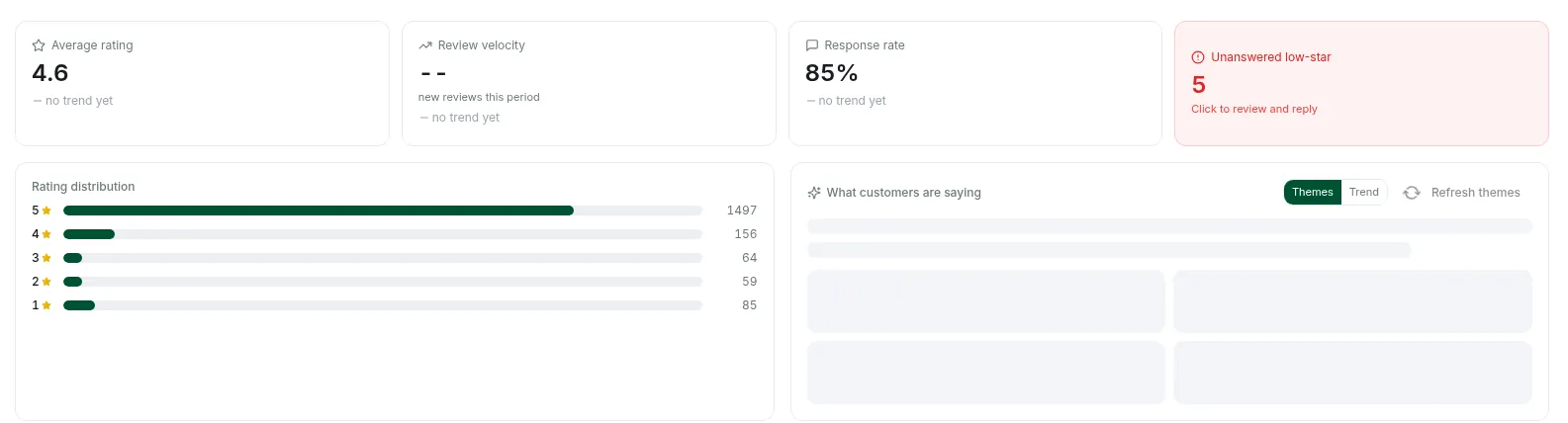
Two numbers tell you whether the habit is working: your response rate (the share of reviews with an owner reply) and how many low-star reviews are still unanswered. In DataWise, the Local Pack project in rank tracking shows both on its reviews panel. Here’s a real one from an anonymized restaurant profile we tracked:
If you work in an AI assistant, the DataWise MCP server can read a business’s most recent reviews with their text, plus a Local Pack project’s review picture. Ask it for the week’s queue and a first draft for each reply. The MCP tools are read-only, so nothing gets posted until you copy, edit, and post the reply yourself, which is exactly how it should be. Our Grok Bot SEO team walkthrough shows how to connect it.
Weekly review reply drafts
Use DataWise to read the 20 most recent Google reviews for [business name, city]. List every review from the last 7 days, sorted 1-star first. For each one, draft a reply under 60 words that thanks the reviewer by first name, mentions one specific detail from their review, and for 1 to 3 star reviews, owns any mistake, says what changes, and gives [contact name and phone]. No discounts or offers, no customer details beyond their first name, no arguing. Flag any review that looks fake or off-topic instead of drafting a reply, and say which Google policy it might break.
Read every draft before posting. An AI draft that sounds like it came from a press office is the “generic template” your customers already tune out.
Can you reply to Google reviews from ChatGPT or Claude?
Yes, if you connect your Business Profile to the assistant through Windsor.ai. Its write actions let ChatGPT, Claude, or another MCP-compatible assistant post a reply to a review when you ask, and the assistant shows you the exact reply before it posts (Windsor.ai: manage Google Business Profile with an AI assistant).
Two details worth knowing before you set it up. Write actions are prompt-triggered, not background monitoring: the assistant won’t spot a new 1-star at midnight and answer it on its own, so you still ask for the review pass each session. And replying again replaces your existing reply rather than adding a second one (same Windsor.ai page). Windsor has setup guides for ChatGPT and Claude.
That’s the main difference from the DataWise workflow above. The DataWise MCP stays read-only, so it gives you the review queue and drafts, and you post them yourself. Windsor can post the reply for you once you’ve approved the wording. Either way, the same rule applies: you read every reply before it goes live.
Disclosure: the main Windsor.ai link above is a referral link.
What’s the next step?
Pick your three oldest unanswered low-star reviews and reply to them today using the five-step structure above. Then block 20 minutes a week for the rest. If you want the response rate and unanswered count tracked for you, the Local Pack tools in DataWise rank tracking are included with AI Ranking community membership.
FAQ
Why can’t I reply to a Google review?
The most common reason is that the profile isn’t verified: Google only lets you reply after your business is verified (Google Business Profile Help). Reviews are also only available in some countries and business categories. If you are verified and the Reply button is there but your reply never shows, it was probably held for a policy check.
How long does it take for a reply to a Google review to show up?
Most replies are checked and posted within about 10 minutes, but Google says the check can sometimes take up to 30 days (Google Business Profile Help). If it isn’t approved, you’ll be asked to edit it. You can edit or delete a reply later from the same Read reviews screen.
Does the reviewer know when I reply, and can they change their review?
Yes to both. The reviewer is notified when you reply, and they can still edit their review afterward; if they do, the review’s date updates to the latest edit (Google Business Profile Help). That’s why a calm, helpful reply to a bad review sometimes ends with an upgraded rating.
Do review replies help local SEO?
Google lists “Respond to reviews” among its tips to improve local ranking, but the ranking factors it names are relevance, distance, and prominence, with review count and ratings feeding prominence (Google local ranking help). Treat replies as a trust signal for customers first. Any ranking benefit is a bonus Google doesn’t promise.
How many 5-star reviews does it take to cancel out a 1-star review?
It depends on how many reviews you already have. Treating your rating as a plain average (a simplification, since Google doesn’t publish its exact formula), a 5.0 from 9 reviews drops to 4.6 after one 1-star, and you’d need 6 more 5-star reviews to climb back to 4.75. With 200 reviews at 4.8, a single 1-star barely moves the needle. The more reviews you have, the less any one hurts.

Nicolas Gorrono
Founder of DataWise SEO and the AI Ranking community. Writing about SEO, AI search, and data-driven optimization.
Put these insights into action
Join the AI Ranking community to get unlimited DataWise access, included with your membership. 7-day risk-free trial.
Join AI Ranking