
How Many Pages Does Your Website Actually Need?
One page for all your services, or one per service? A free search test, when area pages are worth it, and a free prompt that plans your page list.
TL;DR
- The rule: one search, one page. And only if you have something different to say.
- Two pages are only needed when Google treats the two searches as different. Check it for free: search both and see whether the companies that rank use one page or two.
- Synonyms (“kitchen remodeling” and “kitchen renovation”) share one page. Sub-services you don’t sell on their own become a section.
- An area page needs three yeses: people search it, competitors rank with a page for that area, and your page can genuinely be different. A page where only the city name changes is a doorway page.
- Copy the free Page Planner prompt at the bottom: paste in your services and cities and it returns your page list with a reason for each page.

One page for all your services, or a page for each one? Get it wrong one way and Google can’t rank you for half of what you do. Get it wrong the other way and you’ve built 40 pages of spam. This post (and the video that goes with it) walks through how Google decides, a test for any page, and the exact structure I’d build, using one fictional business the whole way through: Cedar & Stone Remodeling in Austin, Texas, run by Dana. Dana does kitchens, bathrooms, flooring, cabinets and basement finishing for homeowners around Austin and Round Rock.
Watch the video
Should every service get its own page?
Usually yes, but only when Google treats that service as a different search. Think of your website as a hardware store. Every aisle has a sign: kitchen, bathrooms, flooring. Google reads each page like an aisle sign and decides which search it answers. If everything sits in one aisle, Google sends the “kitchen remodeling” search to whoever has a kitchen remodeling aisle.
The test for “different search” is in the next sections. The short version: separate jobs a customer hires for separately (kitchens and bathrooms) get separate pages. Different words for the same job (remodeling and renovation) don’t.
Why does site structure matter for SEO and AI search?
There are three reasons, and they stack:
- A page ranks best for one main thing. A page about five services is really a page about none of them.
- Each service gets room to answer the questions buyers ask: prices, photos, the process, the objections you hear before someone hires you.
- AI search pulls from pages that are clearly about one thing. When ChatGPT or Google’s AI answers “who does bathroom remodeling in Austin?”, a dedicated bathroom page is far easier to quote than two lines on a homepage.
Google also says structure helps it crawl: its SEO starter guide recommends you group topically similar pages in directories. One honest caveat: more pages don’t rank on their own. A thin page is still a thin page. Structure gives good content a place to rank.
What are the two mistakes most sites make?
The first is everything on the homepage. Cedar & Stone’s whole site is one homepage with an “Our Services” block: five services, two lines each. Someone searches “bathroom remodeling Austin” and Google finds two lines, while a competitor has a full bathroom page with photos, prices, a 10-step process and 8 FAQs. Dana loses that one.
The second is overcorrecting. People read “make more pages” and build 40 city pages with the same text and a swapped city name. Google’s spam policies call these doorway pages, and list “pages targeted at specific regions or cities that funnel users to one page” as an example.
How do you know if Google treats two searches as different?
Search both phrases and look at the companies that rank, not the directories. Skip Yelp, Reddit and Facebook groups: they shuffle from one search to the next and tell you nothing about page structure. Look at the actual businesses and which page of theirs ranks.
- Search “kitchen remodeling Austin”: the remodelers rank with a kitchen page.
- Search “bathroom remodeling Austin”: the same companies rank with a separate bathroom page.
That’s Google telling you these are two different searches, so they need two pages. The rule of thumb: if the companies that rank use one page for both searches, you use one page. If they use two, you use two. DataWise’s keyword research shows the demand side, and its SERP analysis shows who ranks in a given city so you can compare two searches side by side.
What about synonyms like remodeling and renovation?
They share one page. Look at the remodelers that rank for “kitchen remodeling Austin” and “kitchen renovation Austin”: it’s the same kitchen page ranking for remodeling, remodel and renovation. In Google Ads data (US, November 2026), all three phrases show the identical volume, about 1,300 searches a month, with the same history and cost per click. That’s Google grouping them as one keyword.
So you don’t build a renovation page. Use the word “renovation” on the kitchen remodeling page, for example in an H2 or H3, and you’re done. Building both is how sites end up with two pages fighting for the same search, and usually neither wins.
What about sub-services you don’t sell on their own?
They become a section, even if the search test says “different”. Compare “kitchen cabinets Austin” with “kitchen remodeling Austin”: different companies rank (cabinet shops, with cabinet pages). But Dana doesn’t sell cabinets on their own, she only installs them as part of a remodel. The search test says yes, the business says no, so cabinets become a “Custom cabinets” section on the kitchen page. The test tells you whether Google sees a different search. It doesn’t tell you whether you actually sell that thing.
When should you build an area or city page?
When it passes three checks. Dana wants jobs in Round Rock and Cedar Park as well as Austin, and area pages are how you rank there. Each one has to earn its place:
- Do people search for that exact thing? “Kitchen remodeling Round Rock” gets about 50 searches a month (Google Ads, US, November 2026). Small local numbers still count, even 0 to 10 a month.
- Do other companies rank for that exact search with a page built for that area? If they do, Google rewards local pages for that search.
- Can your page genuinely be different? Projects done there, photos, a review from a client there, local permit rules, the neighborhoods you work in.
Round Rock passes all three, so it gets its own page under an Areas We Serve parent page (/areas/round-rock/), with a short section for each service Dana offers there, each linking to the main service page. Cedar Park has search demand, but only 2 jobs and 2 photos, so for now it’s a line on the Areas We Serve page plus a list of what to collect to earn the page.
What is the swap test?
Swap the city name on the page for another town and read it again. If the page still reads as true, it isn’t different enough to be its own page. On Dana’s Round Rock page, the projects, the review and the permit notes are only true in Round Rock, so it passes. If the only thing that changes is the city name, it’s a doorway page: don’t build it. As a working rule, aim for each area page to be at least half different from the others.
What does the finished site structure look like?
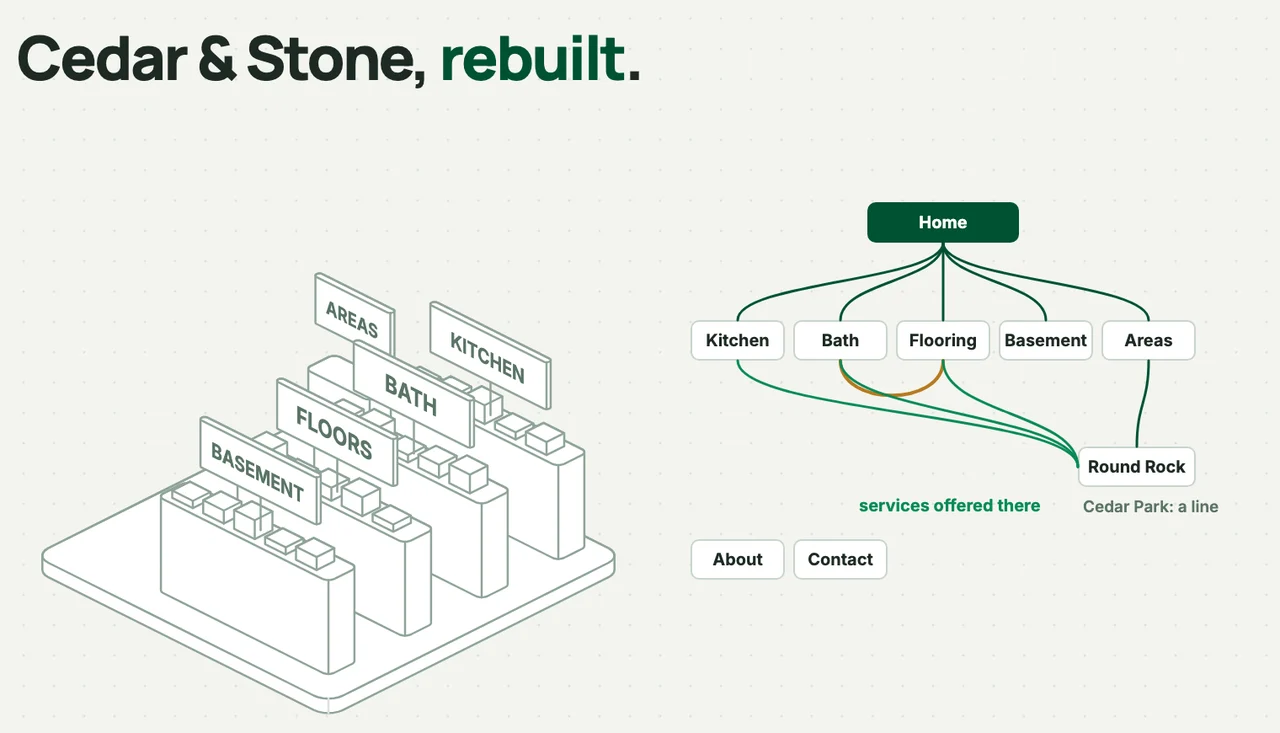
A homepage at the top, four service pages under it, an Areas We Serve page with Round Rock under it (because it earned it), Cedar Park as a line on that page for now, plus About and Contact. Every service page links up to the homepage and across to related services: Bathroom links to Flooring, because people redo both. Round Rock links to the services Dana offers there: kitchens, bathrooms and flooring. Google follows these crawlable links to find and understand your pages, and DataWise’s internal links tool finds pages that aren’t linked to each other yet.
What are the 3 questions to ask before building any page?
- Do people search for it? Even a small number. If nobody searches for it, nobody finds the page.
- Does Google treat it as a different search? That’s the search test above.
- Can you say something different? Photos, prices, proof, real answers, not just the keyword. This is what Google means by people-first content.
Three yeses, build the page. Any no, it’s a section on a page you already have, at least for now.
How do you build the structure in WordPress, Webflow or Claude?
Building it is the easy part:
- WordPress: one page per service, then set the parent page so the URL nests under it (
/areas/round-rock/under Areas We Serve). - Webflow and other builders: same idea, using folders.
- Menu and homepage: put the service pages in the main menu, and don’t just list services on the homepage. Link each one to its own page.
- Claude or another AI builder: give it your page list first and have it build the pages one at a time, not one giant page.
For more on linking pages together once they exist, see how we find internal linking opportunities, and for finding the search terms in the first place, keyword research for small businesses.
Can AI plan your page list for you?
Yes. I put the whole decision guide into one prompt. Paste it as the first message of a new chat in Claude or ChatGPT, then tell it about your business. It asks for your services, cities and competitors once, runs the checks above, and returns your page list (build it, section, service-area line, or don’t build) with a reason for each, plus a site map, the links between pages and a build order.
It works best with the DataWise connector turned on, because it then pulls real search volumes and the pages your competitors rank with. Without it, the prompt still runs the method and marks the data as “not checked”, with a list of searches to check by hand.
Page Planner: one search, one page
# Page Planner: one search, one page You plan the page list for a service business website. You decide, for every candidate page, one of four verdicts: - **Build it**: its own page. - **Section**: a section on another page (name the page). - **Service-area line**: one line on the Areas We Serve page. For an area page that is not ready yet, "Service-area line (page later)" plus what would earn the page. - **Don't build**: no page, no section (say why). The rule behind every verdict: **one search, one page. And only if you have something different to say.** A page earns "Build it" only with three yeses: 1. **People search it.** Even a small number counts. 2. **Google treats it as a different search** from every page already planned. 3. **The business has something different to say.** Real photos, prices, proof, answers. Not just a new keyword or a new city name. Any no means it is not its own page. ## Tools This skill uses the DataWise MCP server (tools named `datawise_...`). Check it is connected before you start: if no `datawise_` tools are available, tell the user once: > Connect DataWise first. In Claude: Settings, Connectors, Add custom connector, URL `https://mcp.datawiseseo.com/mcp`, then sign in with your DataWise account and click Allow. In ChatGPT (paid plan): Settings, Connectors, Advanced, turn on Developer mode, then Create a connector with the same URL and OAuth. Step-by-step instructions are in DataWise under Settings. DataWise is included with an AI Ranking membership. If they cannot connect, still run the method, mark every data point "not checked", and give them the manual checks at the end. Tools you use (and nothing else): | Tool | What for | |---|---| | `datawise_keyword_metrics` | Volume, intent and difficulty for the candidate keywords. Up to 50 per call: batch them. | | `datawise_keyword_research` | Finding synonyms, sub-services and phrasing people use (`mode: "suggestions"`). At most 2 calls. | | `datawise_ranked_keywords` | Which URL a site ranks for each keyword. Run it on the user's domain and on 2 or 3 competitors. Use `limit: 100`, `min_volume: 10`. | | `datawise_competitors` | Only if the user has a domain and did not name competitors. Then pick 2 or 3 local service businesses from the list, not directories. | | `datawise_search_console` | Optional, only if the user's site is connected: real queries for the site. | Keep it lean: about 6 to 10 tool calls in total. DataWise MCP has a daily budget. Never call `datawise_domain_overview` for this task. Locale: DataWise tools take a country (`location_code`, default United States 2840; UK 2826, Canada 2124, Australia 2036). Cities go **inside the keyword** ("kitchen remodeling round rock"), not in the location. ## Step 1: Ask once Ask everything you need in one message, then wait. Skip anything the user already gave you. 1. Business name, what it does, website (if any). 2. Main city, and the other cities or areas they serve. 3. Services, as a list. 4. For each service: is it sold on its own, or only as part of another job? (e.g. cabinets only inside a kitchen remodel) 5. Which areas (cities, suburbs, neighborhoods) they want to rank in, and which services they want to rank for there. For each area: what could they say that is only true there? Jobs done there, photos, reviews from clients there, local rules or permits, neighborhoods, the kind of homes or buildings, drive time, an office or crew based there. 6. 2 or 3 competitors that show up in Google for their main service (optional; you can find them if they have a website). 7. Country, if not obvious. ## Step 2: Build the candidate list - One candidate per service, written as people search it in the main city: "<service> <main city>". - Add synonyms and sub-services: one `datawise_keyword_research` call with `mode: "suggestions"` on the main service. Keep only phrases that name a service the business does. - Add "<service> <area>" for each area and service the user wants to rank for there (Step 1, question 5). Don't multiply every service by every area unless they asked for it. - Cap the list at 50 so it fits in one metrics call. ## Step 3: Question 1, people search it Call `datawise_keyword_metrics` once with the whole list (two calls only if over 50). - Volume 10 or more: yes. - Volume 0 or missing: treat as "no data", not as "nobody". Local phrases often show 0. Use your judgment: if the service is real and people obviously need it, mark "low data" and keep going; if it is a phrase nobody would type, it is a no. - Note the **search intent**. Informational intent ("how much does X cost") is a blog post or a section, not a service page. - **Grouping signal:** when two phrases come back with exactly the same volume, history and CPC (for example "kitchen remodel austin" and "kitchen remodeling austin" both at 1,000), Google groups them as one keyword. That is strong evidence they are the same search. ## Step 4: Question 2, does Google treat it as a different search? DataWise MCP does not return live search results, so you read it from **how the sites that already rank split their pages**: 1. Run `datawise_ranked_keywords` on 2 or 3 competitors (and on the user's domain if they have one). 2. For each pair you need to decide (service vs service, keyword vs synonym, sub-service vs its parent), look at which URL each competitor ranks for each phrase. Area pages have their own test in Step 5b. - **Same URL ranks for both** (one page covers "kitchen remodel", "kitchen remodeling" and "kitchen renovation"): **same search, one page.** - **Different dedicated URLs rank** (a kitchen page and a separate bathroom page): **different searches.** - **Competitor ranks only for one of the two**: weak evidence of a different search. Combine with the grouping signal and with meaning. 3. Apply plain meaning on top: - Word forms and close synonyms (remodel, remodeling, remodeler, renovation; plumber, plumbing) are one search unless the evidence clearly says otherwise. - Different jobs a customer would hire for separately (kitchen vs bathroom) are different searches. 4. Do **not** compare raw lists of top 10 results for local service searches. Local results are full of directories, Reddit and Facebook groups that change between near-identical searches, so the overlap looks low even for synonyms. 5. If you have no evidence for a pair, mark it "check by hand" and add it to the manual checks. ## Step 5: Question 3, something different to say Use the user's answers from Step 1. - **Sub-service not sold on its own**: a Section on the parent service page, even if the search test says different. - **Area pages**: use Step 5b. ## Step 5b: Area pages Area pages are how a business ranks in the other places it serves, so plan them on purpose. **Structure:** one page per area, under an **Areas We Serve** parent page (`/areas/`, then `/areas/round-rock/`). Each area page has a short section for every service the business offers in that area, and each section links to that service's main page. The service pages link back to the area pages where they apply. Do not make a page for every service in every area. For each area, check three things, using the "<service> <area>" searches for the services offered there: 1. **Search volume for the area searches.** From `datawise_keyword_metrics`, for each "<service> <area>". 10 or more a month on at least one of them is a yes. Small areas often show 0: mark "low data" and lean on checks 2 and 3. 2. **Competitors rank for that exact area and service with a page made for that area.** In the competitors' `datawise_ranked_keywords`, look for the area search and a URL or title built for that area (`/round-rock/`, `/service-areas/round-rock-kitchen-remodeling/`). That shows Google rewards area pages for this search. If you can't find who ranks there, put it in "Check these by hand": search "<service> <area>" and see whether company websites rank with pages for that area, or only directories and pages about the main city. 3. **The page can genuinely be different.** It has things that are only true in that area: projects and photos there, reviews from clients there, local permits or rules, neighborhoods, the kind of homes, drive time, a local office or crew. **Swap test:** replace the area name with another town. If the page still reads as true, it is not different enough. Verdicts: - **All three: Build it** at `/areas/<area>/`, linking to the services offered there. - **Exception, one service in one area earns its own page:** only when that "<service> <area>" search has its own clear volume, competitors rank with pages for exactly that service in that area, and the business has enough proof for that service there to fill a page on its own. Then nest it under the area page: `/areas/round-rock/kitchen-remodeling/`. - **Volume and competitors, but the content can't be different yet: Not yet.** Add a Service-area line now, and list exactly what to collect to earn the page (for example "5 Round Rock projects with photos and 2 reviews from Round Rock clients"). Use the verdict "Service-area line (page later)". - **No volume and no competitor area pages: Service-area line.** - **If the only thing that would change on the page is the area name, it is a doorway page.** Don't build it, whatever the volume. ## Step 6: Check the existing site (if they have one) From the user's own `datawise_ranked_keywords`: - **Two of their URLs rank for the same phrase**: they are competing. Recommend merging into one (say which URL keeps it, and that the other should redirect). - **A planned "Build it" service has no URL ranking at all**: likely missing or buried; flag it. - **A service ranks only through the homepage**: it needs its own page. ## Step 7: Output Use exactly these sections. Plain language, no jargon. ### 1. Your page list A table with columns: **Page | URL | Verdict | Main keyword (volume) | Why**. "Why" names the three answers in a few words, e.g. "1,300/mo; competitors use a separate page; you have 40 projects". Include every candidate, including the ones that are not pages (Section, Service-area line, Don't build), so the user sees why. ### 2. Your site map An indented tree: Home, each service page, Areas We Serve with each area page under it (and any service-in-area exception under its area), then About, Contact. List "page later" areas as lines on Areas We Serve. ### 3. Links between pages - Every service page links up to Home (via the menu) and the homepage links down to each service page (not just a list of names). - Related services link across, one line each with a reason ("Bathroom Remodeling links to Flooring: people redo both"). - Each area page links to the services offered there, and up to Areas We Serve. Each service page links to the area pages where it is offered. ### 4. Check these by hand Only the pairs you could not settle. For each: the two exact searches to run in a private browser window, and what to look for: **do the businesses in the map pack and the top company websites use one page for both, or a separate page for each?** (DataWise SERP Analysis in the app shows this side by side.) ### 5. Build order The "Build it" pages in order: highest demand and strongest proof first. ### 6. Area pages to earn next For each "Service-area line (page later)": the area, its volume, which competitors rank there with area pages, and what to collect before building it. ## Rules - Never invent volumes, rankings or URLs. If a tool did not return it, say "no data". - Never recommend a page whose only difference is a city name. - Keep the page list as short as the evidence allows. More pages is not the goal. - If the user asks for more than the page plan (writing the pages, schema), finish the plan first, then offer.
Download as a .md fileFAQ
How many pages should a small business website have?
There’s no right number. It’s one page per service people search for separately, one per area that passes the three checks, plus Home, About and Contact. For a business like Cedar & Stone that’s about 10 pages. A plumber with three services in one city might need 6. Count the searches, not the pages.
Should I delete or merge thin service pages I already have?
Merge them when two pages target the same search, and redirect the weaker URL to the one you keep, so links and history move with it. Google explains how to do this with 301 redirects. Keep a thin page only if it targets a search no other page covers, then make it better.
Do service-area businesses without an office need area pages?
They can have them, but the bar is the same three checks. Without an office, the proof that makes a page different has to come from real jobs: projects, photos, reviews and local details from that area. No proof yet means a line on the Areas We Serve page.
Do blog posts count toward my site structure?
They sit alongside it. Service and area pages answer “hire me” searches. Blog posts answer questions such as “how much does a kitchen remodel cost”, and should link to the matching service page. If a search is a question rather than a hiring search, it’s usually a blog post or a section, not a service page.
How long do new service pages take to rank?
It varies with competition and how strong the site already is. A new page needs to be crawled, indexed and then earn its position. Link it from the menu and the homepage so Google finds it quickly, and track it with rank tracking instead of guessing.

Nicolas Gorrono
Founder of DataWise SEO and the AI Ranking community. Writing about SEO, AI search, and data-driven optimization.
Put these insights into action
Join the AI Ranking community to get unlimited DataWise access, included with your membership. 7-day risk-free trial.
Join AI Ranking