Local Rank Tracking: How to Check Your Google Maps Rankings (Single-Point vs Geo-Grid)
Learn how a local rank tracker works: why one Maps search lies, single-point vs geo-grid, grid size, keywords to track, and how to read coverage over time.
TL;DR
- A local rank tracker checks where your Google Business Profile shows for a search from a chosen location, not from wherever you happen to sit.
- One Maps search from your desk is not your city-wide position: Google ranks local results on relevance, distance, and prominence.
- Single-point checks are fine for a quick pulse; geo-grid scans map the same keyword across many GPS points so you see neighborhoods you win and lose.
- Track brand, category plus city or suburb, and at least one “near me” query on a fixed grid size and radius.
- Read coverage, average position, and competitors together over time; DataWise Local Pack plus GeoGrid (and the MCP audit) fit that loop.

What is a local rank tracker?
A local rank tracker is a tool that records where your business appears in Google’s local results (the map pack and Maps) for a keyword from a specific search location. It is not the same as organic keyword tracking for blue links, and it is not Google Search Console average position. You pick the business listing, the query people use to find you, and the place the searcher is standing. The tracker returns your pack position under those conditions.
I use the phrase “local SEO rank tracker” the same way agencies do: a google maps rank checker that can run one point or a whole grid. The point of the tool is evidence you can re-run next month, not a vanity screenshot from your phone.
Why does a single Google Maps search lie about your ranking?
Because distance is one of Google’s three local ranking factors, so the pack you see at your desk is only the pack for that desk. Google says local results are “mainly based on relevance, distance, and popularity” (Google calls the third factor prominence), and that there is “no way to request or pay for a better local ranking”. If you search “plumber near me” from the shop floor, you will often look stronger than a customer three suburbs away. Personalized history, device, and Maps zoom can nudge things further.
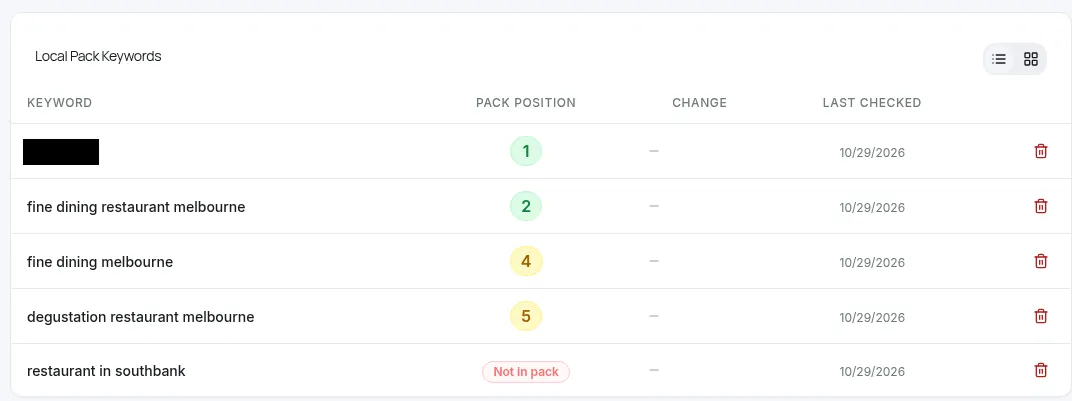
That is why the DataWise Local Pack FAQ is blunt: a single result should not be treated as your position for an entire city (rank tracking Local Pack FAQ). Treat one Maps check as a sample, not a scoreboard. If you want the profile work that feeds relevance and prominence, start with Google Business Profile optimization; this post is about measuring the map, not rewriting the listing.
What is the difference between single-point and geo-grid tracking?
Single-point tracking runs one search from one GPS coordinate (often your address or the city center) and returns one position. Geo-grid tracking (sometimes called a google local rank tracker with a heatmap) lays a grid of points around a center, runs the same keyword from each point, and maps where you sit in the top 3, further down, or not at all.
| Method | What you get | Best for | Blind spot |
|---|---|---|---|
| Single-point | One pack position for one location | A quick health check, brand queries, confirming a listing is found | Hides street-by-street swings driven by distance |
| Geo-grid | One position per grid point, plus coverage and average position | Service-area truth, client reporting, finding weak suburbs | Costs more checks; useless if you change size or radius every time |
I reckon single-point is fine when you already know the market is tiny, or you only need to confirm brand visibility. The moment you care about “where do we actually show for customers across town?”, you need a grid. On the live DataWise homepage that map view is called Local Rank Tracking with GeoGrid, and it sits inside the broader keyword rank tracking suite next to Search Console and tracked keywords.
How do you choose grid size and radius?
Pick a grid size for resolution and a radius (or spacing) for how much ground you cover, then freeze both for every re-scan. Common sizes are 3x3 (9 points) for a quick neighborhood pulse, 5x5 (25 points) for a suburb or small town, and 7x7 or larger when rank changes district by district. A cafe that lives on foot traffic wants tight spacing; a mobile trades business that drives across a metro wants wider spacing so the outer rings still mean something.
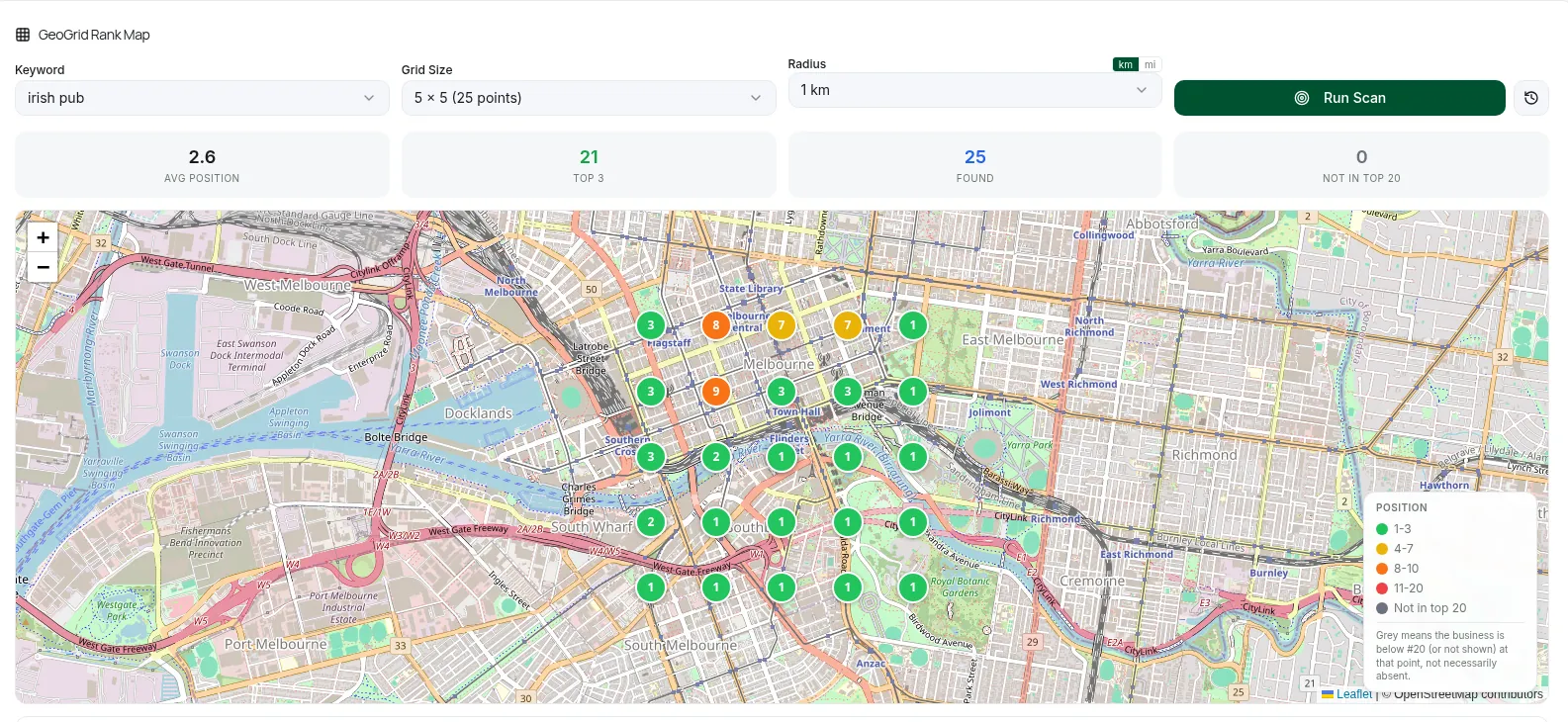
Keep the keyword, grid size, and radius identical from one run to the next. If you widen the radius after a good month, your average position can look worse even when nothing changed near the door. Log the center point too (usually the business pin). When we published the Southbank checks in the GBP optimization post linked above, both venues used a 5x5 grid at 1 km so the rows could be compared as patterns, not as a contest between different footprints.
Which keywords should you track for Google Maps?
Track a short mix: brand name, category plus city or suburb, and at least one “near me” query. Brand shows whether Google can match you by name. Category plus place shows relevance against rivals. “Near me” shows the distance effect when the searcher does not type a suburb. Skip stuffing your business name with keywords; that is a suspension risk covered in the GBP guide, not a tracking tactic.
| Keyword type | Why track it | Example pattern |
|---|---|---|
| Brand | Confirms the listing is found and matched | Your exact business name |
| Category + suburb | Relevance close to home | ”irish pub southbank” |
| Category + city | Relevance against city-wide rivals | ”fine dining restaurant melbourne” |
| Near me | Distance plus relevance without a typed place | ”irish pub near me” |
| Broad category + place | Stress test; often too wide for a niche | ”restaurant in southbank” |
On 29 October 2026 we published map checks for two Southbank venues on those patterns: the Irish pub sat in the top 3 at 21 of 25 points (avg 2.6) for “irish pub” on a 5x5, 1 km grid, while the fine-dining venue managed 10 of 25 top-3 points (avg 5.2) for its category search, even though both profiles scored 100% complete (same GBP optimization post). A later stored DataWise geo-grid for the same pub keyword (scanned 26 September 2026, read via MCP audit on 5 November 2026) still showed 20 of 25 top-3 points and average position 2.0. Different scan dates, same lesson: one number from one desk would have hidden how uneven the map still is.
Keep the watchlist small enough to re-run. Five focused queries beat fifty you never open again. If the grid shows weak areas, a local SEO audit helps you find the cause beyond the map.
How do you read coverage, average position, and competitors over time?
Read three numbers together, on the same keyword and the same grid, then look at who beats you where. Coverage (or found points) is how many grid points return your listing at all. Top-3 share is how often you sit in the map pack people actually tap. Average position summarizes the points where you appear; it can look fine while top-3 share is weak if you are stuck in fourth. Competitor tables show which rivals own which pockets, often with their rating and review counts attached.
| Metric | Question it answers | How to use it |
|---|---|---|
| Found / coverage | Are we visible anywhere on this grid? | Rising found points after a category or service fix is a good early signal |
| Top-3 points | Do we win the pack people see? | Compare to last scan before celebrating an “average” improvement |
| Average position | How strong are we when found? | Pair with top-3 share; do not report it alone to a client |
| Competitor appearances | Who owns weak cells? | Check their category and distance before copying their review count |
A fine-dining venue can be “found” at every point and still lose the pack. Mind you, that is not a broken tracker; it is distance and relevance doing their job. Re-run on a fixed cadence (monthly is enough for most local businesses), log profile changes on the same calendar, and compare full periods. Pair the grid with the Business Profile Performance report for calls, directions, and website taps, because those are engagement metrics, not pack positions. Separately, AI visibility tracking watches citations in AI answers for your website; it does not replace a Maps grid.
How does DataWise Local Pack and GeoGrid fit this workflow?
DataWise puts local pack checks and GeoGrid next to Search Console and tracked keywords so you can investigate a local query without stacking another subscription. Create or open a Local Pack project for the Google listing, add the keyword mix above, run a single-point check when you need a pulse, then run a geo-grid when you need the map. The rank tracking Local Pack docs are explicit that local results depend on search location, so you review the conditions of each check. If you work inside an AI assistant, the DataWise MCP server can pull a Local Pack project’s profile completeness, rankings, reviews, and latest geo-grid scan without you exporting CSVs.
Local Pack + geo-grid review prompt
List my DataWise rank-tracking projects and ask which local project to use. For that project, run a GBP / Local Pack audit for the last 30 days. Summarize profile completeness, keyword pack positions (current vs previous), review rating and count, and the latest geo-grid (keyword, grid size, radius, found points, top-3 points, average position, and the top competitors with rating and review counts). State every scan or check date. Do not invent numbers. End with three prioritized next checks, and keep profile optimization advice separate from rank measurement.
Next step: pick one brand query, one category plus city query, and one “near me” query, run them on a 5x5 grid at a radius that matches how far customers travel, and save that as your baseline. DataWise is included with the paid AI Ranking community membership, from $27/month.
FAQ
Can I check my Google Maps ranking for free without a tool?
You can open an incognito window, set a temporary location, and search once, but that is still a single-point sample with no saved history. Free one-off checkers exist on the open web; treat them as a spot check. For client work or month-to-month decisions you need repeatable conditions: same keyword, same center, same grid, dated results.
Do businesses pay to appear higher in Google Maps organic results?
No. Google states there is no way to request or pay for a better local ranking, and ads sit apart from the organic local results (Google local ranking help). Paid campaigns can put a sponsored listing above the map pack without changing your organic spot. If someone sells a guaranteed pack position, walk away.
How often should I re-run a geo-grid scan?
Monthly is enough for most single-location businesses; weekly only when you are mid-change and need a short feedback loop. Always re-run after a material profile edit (category, service area, major review spike) and wait for a complete comparison period before calling the move a win. Keep size and radius fixed so the trend means something.
Is Google Search Console average position the same as a Maps rank?
No. Search Console average position summarizes impressions across many searches, devices, and layouts in a date range. A Maps or local pack check records one result under chosen conditions at one time. DataWise documents that these sources describe different things on the rank tracking FAQ linked earlier, so do not expect the numbers to match. Search Console is a multi-impression average; a Maps check is one conditioned sample (Google Search Console Help on performance reports).
How long does it take for a business to show up on Google Maps after claiming?
Verification reviews can take up to 5 business days, and a brand-new or newly verified listing can take longer to stabilize in local results depending on category competition and how complete the profile is. Tracking starts after the listing is live enough to be found; until then, fix completeness and verification rather than obsessing over grid averages.

Nicolas Gorrono
Founder of DataWise SEO and the AI Ranking community. Writing about SEO, AI search, and data-driven optimization.
Put these insights into action
Join the AI Ranking community to get unlimited DataWise access, included with your membership. 7-day risk-free trial.
Join AI Ranking