
Compress the images dragging down your LCP
The image audit names every oversized asset, the URL it sits on, and how much weight a WebP conversion would save. Most sites recover one to three seconds of load time from this alone.
Crawl any site and surface the on-page issues that actually move rankings. Speed score, load time, the exact reasons a page is slow, title and meta gaps, heading structure, and a Kanban fix board so issues get shipped, not filed.
6 focused sub-tools, one unified workflow.
One-screen summary of every page crawled: status codes, response times, page weight, and the count of critical, warning, and info issues per URL.
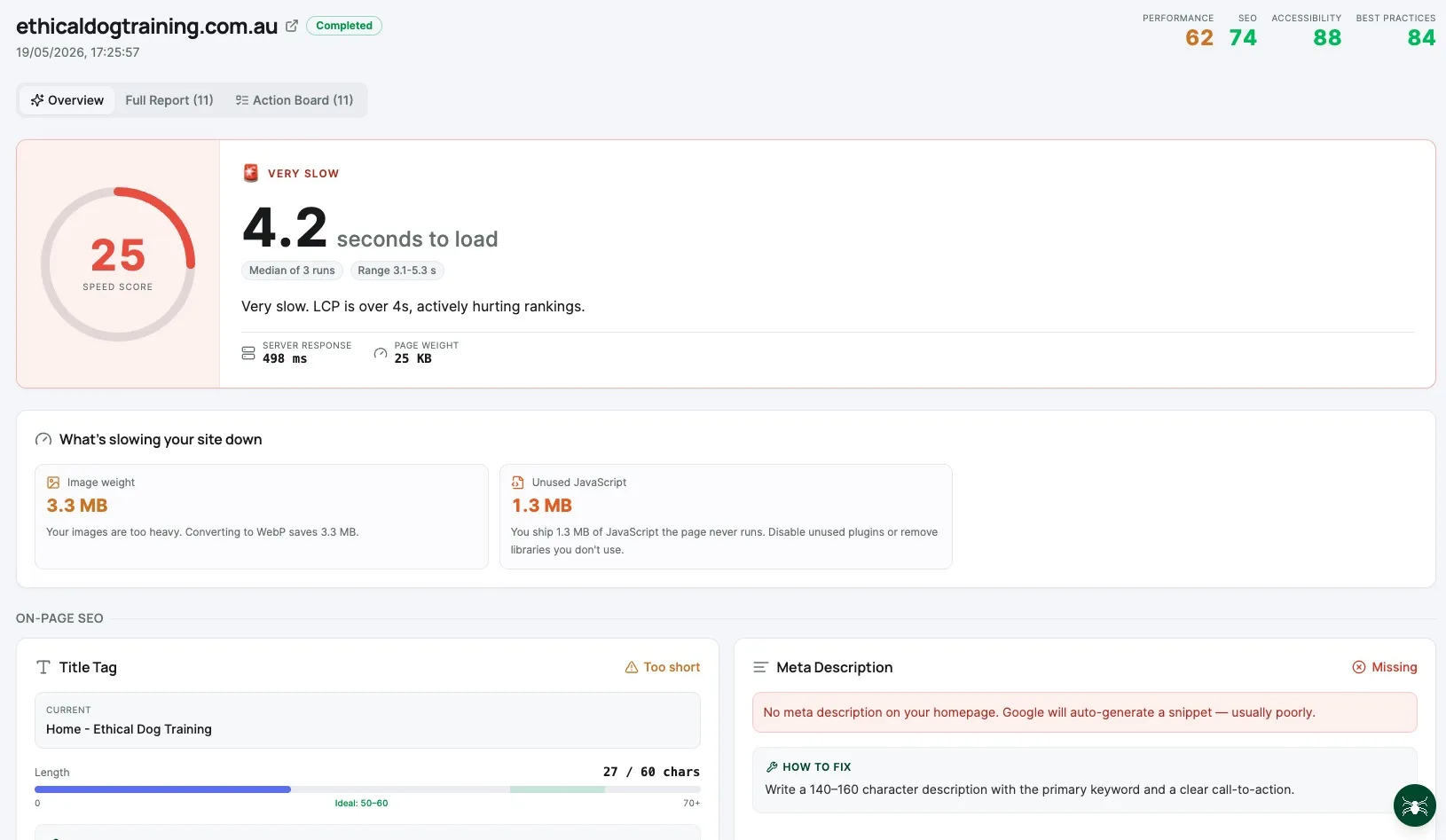
LCP, CLS, INP and total load time per page, color-coded against Google's pass / needs-improvement / fail thresholds, with the heaviest assets called out by name.
Title tag length, missing meta descriptions, duplicate or missing H1s, broken internal links, redirect chains, and orphan pages, surfaced in one filterable table.
Every oversized image flagged with current size, recommended size, and whether converting to WebP would save more than fifty percent of the file weight. Click straight through to the URL that needs work.
Robots.txt, canonical, noindex, and sitemap inclusion checked per URL so you can spot pages Google cannot index and pages it should not be indexing.
Every issue auto-promoted to a card with severity, affected URL, and a remediation checklist. Drag through To do, In progress, and Done to actually close the loop.
Drop any domain or specific URL, hit Audit, and DataWise spins up a DataForSEO crawl. Most sites return a full report in a couple of minutes.
The overview opens on Core Web Vitals and total load time, with the exact images, scripts, and styles slowing the page down ranked by impact.
Click Send to board and every flagged issue becomes a card with a remediation checklist. The audit stops being a document and starts being a backlog you can burn down.
Walk through DataWise's Site Audit tool: paste a URL, run the audit, and read the speed score, total load time, the specific reasons a page is slow (heavy images, unused JavaScript), plus a quick read on title tags, meta descriptions and heading structure. Every issue flows into a Kanban action board with step-by-step fix instructions.
A good keyword research tool does not just hand you a list of words: it reveals where the winnable traffic actually lives. Here is what you will uncover in your first hour.
The image audit names every oversized asset, the URL it sits on, and how much weight a WebP conversion would save. Most sites recover one to three seconds of load time from this alone.
Pages with no meta description hand Google a free pass to write one for you, almost always worse than what you'd write. The audit lists every offender so you can rewrite once and ship in a sprint.
Pages with two H1s, no H1, or heading levels skipped (H1 to H4) confuse both Google and screen readers. The audit flags every page with broken heading order so you can fix structure in bulk.
Three-hop redirect chains and redirect loops waste crawl budget and frustrate users. The audit traces every chain end to end and tells you exactly which final URL to point at.
Thin tags, faceted-filter URLs, and old campaign landing pages bloat your index and dilute topical authority. The indexation check shows you what's in the index that should not be, ready for a noindex push.
Most audits die in a PDF nobody opens. The Kanban board turns the audit into a ranked, owner-assignable backlog so the work actually happens and you can prove progress month over month.
From solo creators to agency teams, every seat gets the same unlimited access.
A freelance SEO running a discovery audit pastes a new client's homepage URL, returns in three minutes with a speed score of forty-one, a list of seven oversized hero images, and four pages missing H1s. The Kanban board becomes the first month's deliverable, with the client signing off on each fix as it closes.
A founder shipping a new marketing site runs the audit before launch, catches a meta-description gap on six pillar pages and a 4MB hero image on the homepage, and ships fixes the same afternoon. Pre-launch instead of post-mortem.
An in-house SEO runs the audit weekly against a staging deploy, catches a regression where a recent push reintroduced a 301 to 302 redirect chain, and files a single Kanban card linked to the offending commit. The fix lands in the next sprint without a war room.
A content lead pulls the audit each month and works the on-page issues board, rewriting title tags and meta descriptions for the bottom-decile CTR pages first. Six weeks in, average position on the rewritten pages is up by 1.4 spots, no new content required.
Track your brand presence in AI-powered search results across Google AI Mode, ChatGPT, Per...
Audit any domain's full backlink profile in seconds. Track referring domains, anchor text ...
Benchmark against competitors with domain authority scores, ranked keywords, traffic estim...
Everything you wanted to know before you start.
Every DataWise tool is included with your AI Ranking membership (from $27/mo). 7-day risk-free trial, no seat limits.