
Claude Opus 5.5 SEO Tutorial: Connect It to Real SEO Data
Claude Opus 5.5 is cheaper and faster than Opus 5, but on its own it can't see your rankings or search volume. Connect it to DataWise and use 4 free SEO prompts.
Claude Opus 5.5 is a strong model for SEO work, but on its own it can’t see your rankings, your search volume, your backlinks or whether AI search engines mention you. So when you ask it what to fix, it’s working from general knowledge, not from your site’s data. Connect it to a live SEO data source and that changes.
This guide shows how I connect Opus 5.5 to DataWise through an MCP connector, and the four free prompts I use once it’s connected: a website audit, a page-2 finder, a page rewrite and an AI visibility check.
Why use Claude Opus 5.5 for SEO?
Claude Opus 5.5 costs less per token than Opus 5 and generates output faster, and Anthropic’s benchmarks put it ahead of both Opus 5 and Fable 5.1 on knowledge work. Anthropic released it on September 22, 2026.
The numbers below come from Anthropic’s Opus 5.5 announcement:
| Opus 5.5 | Opus 5 | Fable 5.1 | |
|---|---|---|---|
| Price per million input / output tokens | $4 / $20 | $5 / $25 | $10 / $50 |
| GDPval-AA knowledge work (Elo) | 1,846 | 1,708 | 1,735 |
| AutomationBench (multi-step business tasks) | 40.0% | 26.9% | 31.4% |
Anthropic also says Opus 5.5 generates output more than 30% faster than Opus 5 and costs about 40% less to run on typical workloads, because it uses fewer tokens to finish a task. One caveat: that 40% figure compares each model at its default settings, and Opus 5.5 defaults to a lower effort level than Opus 5 did. Per token, the saving is 20%.
The speed is the part I genuinely notice day to day. You can’t feel a price difference while you work, but you do feel answers coming back sooner.
It keeps a 1 million token context window. In my experience you don’t want to rely on all of it. Once a conversation gets to around half a million tokens, the quality of the answers starts to drop, so I start a fresh chat well before that.
Why can’t Claude Opus 5.5 do SEO on its own?
Claude Opus 5.5 has no built-in access to keyword search volume, Google rankings, keyword difficulty, backlink data or AI search mentions. It can read your pages with web search turned on, but it can’t know that a page ranks 17th or that a keyword gets 2,900 searches a month.
That’s the gap. A model this capable will still give you generic SEO advice if the only thing it has is your description of the problem. Give it real data and the same model can point at a specific page, a specific keyword and a specific fix.
This is what an MCP (Model Context Protocol) connector is for. It lets Claude call an outside tool, fetch the data and reason over it in the same conversation.
How do you connect Claude Opus 5.5 to DataWise?
Add DataWise as a custom connector in Claude using the URL https://mcp.datawiseseo.com/mcp, then sign in with your DataWise account. It takes a couple of minutes.
- In Claude, open Customize, then Connectors.
- Choose Add custom connector.
- Paste
https://mcp.datawiseseo.com/mcpinto the MCP server URL field and give it a name you’ll recognize, such as “DataWise SEO”. - Leave the advanced authentication settings as they are and click Add.
- Approve the connection when DataWise asks. If you’re already signed in to DataWise in the same browser, this is a single click on Allow.
- Open the connector’s tool permissions and set them to Always allow, so Claude doesn’t stop to ask for approval on every call.
You should see a message confirming the connection. DataWise, connector included, comes with membership of the AI Ranking community. The DataWise MCP feature page lists everything the connector can reach.
If you use ChatGPT instead of Claude, the setup is different. I cover it in how to connect DataWise to ChatGPT.
What can the DataWise connector do inside Claude?
The DataWise MCP gives Claude 14 read-only SEO tools: keyword and question research, competitor and keyword gap analysis, backlinks, your connected Search Console and rank tracking data, AI search visibility, and Google Business Profile audits. It reads data. It never edits your website.
Some tools work on any domain straight away, like keyword research, ranked keywords, competitors, backlinks and AI mentions. Others read data you’ve already set up inside DataWise, such as your Search Console property or a rank tracking project. The four prompts in this guide only use the first kind, so they work as soon as you connect.
If you want Claude to make changes on your website too, that’s a separate connector for your CMS. In Claude’s connector directory you can search for your platform, for example Webflow or WordPress. What Claude can then do depends entirely on that connector’s permissions.
What are the 4 free SEO prompts?
The prompt pack has four copy-paste prompts, each of which turns DataWise data into a dashboard: a website audit, a page-2 finder, a page rewrite and an AI visibility check. You can open the free prompt pack here.
- Prompt 1, website audit: shows how many of your ranking keywords sit past page 1, compares you with your real competitors, checks your key pages and names the three biggest problems.
- Prompt 2, find your page-2 pages: lists the pages ranking in positions 11 to 30 and picks the one worth fixing first, based on how many of those searches you can realistically win.
- Prompt 3, fix the page: reads that page and the pages beating it, explains why it’s stuck and rewrites the title, meta description, headings, opening and FAQ.
- Prompt 4, does AI recommend you?: compares how often ChatGPT and Google’s AI answers mention you versus your three closest competitors.
Pages sitting on page 2 are the low-hanging fruit I usually recommend starting with. Google already considers them relevant, so improving them tends to be quicker than ranking a brand new page.
Run prompts 2 and 3 in the same chat, so Claude remembers which page it picked. Replace the [DOMAIN] and [COUNTRY] placeholders before you send each one.
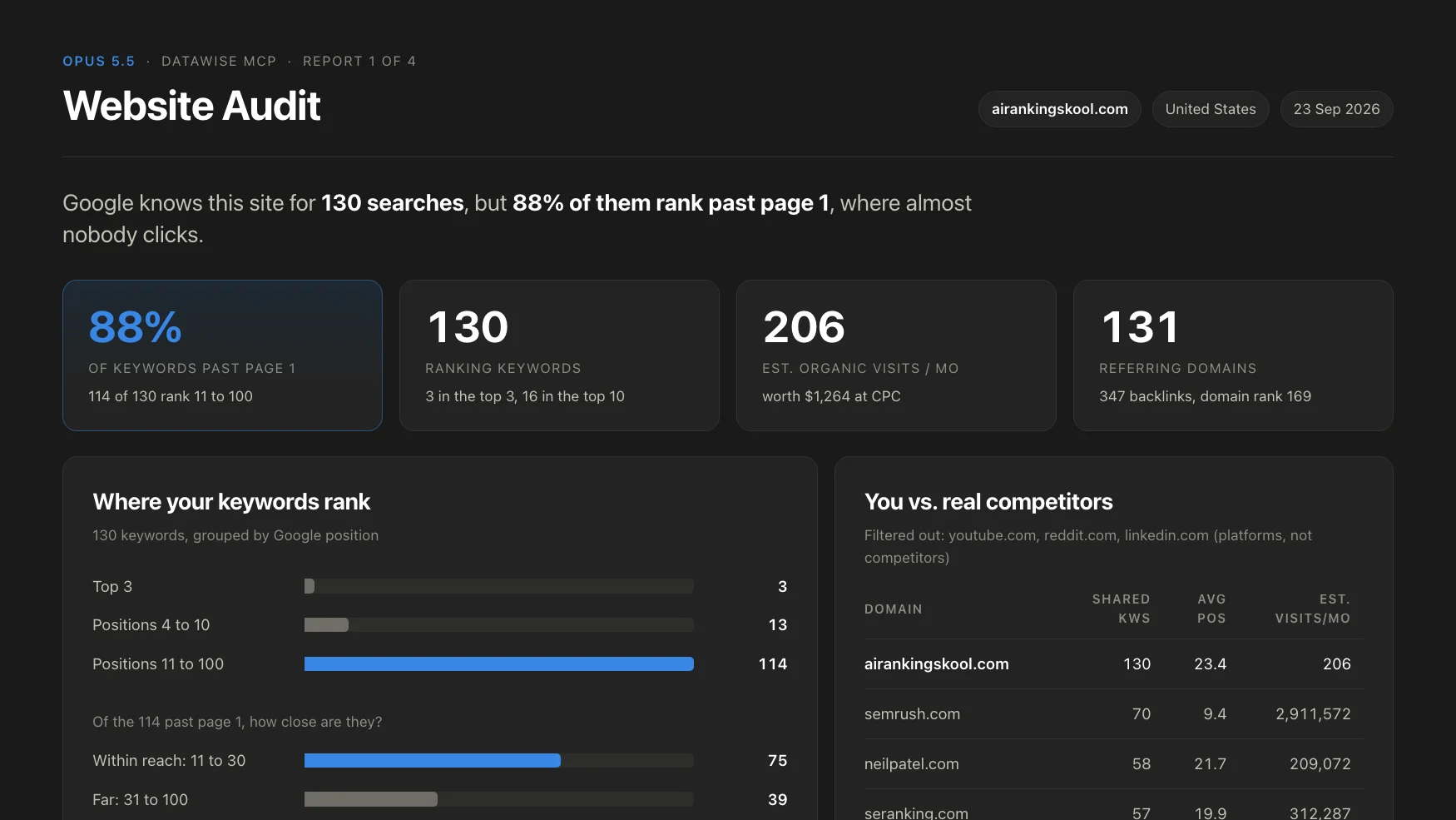
Example output of Prompt 1 on airankingskool.com, using DataWise data retrieved on September 23, 2026.
Which effort level should you use?
Low, medium or high effort is enough for these prompts. You don’t need the extra or max settings. These aren’t rocket science tasks, and max effort mostly burns through tokens.
Using max effort for a routine SEO report is like driving your kid to school in a Ferrari. It gets the job done, but the van would have done it too.
What does the AI visibility report show?
The AI visibility prompt shows how often ChatGPT and Google’s AI answers mention your domain compared with your competitors, which sources those engines lean on, and three changes to try first.
When I ran it on airankingskool.com, the site had 17 mentions in Google’s AI answers and none in ChatGPT, while Semrush had 3,242 ChatGPT mentions in the same sample. That comes from DataForSEO’s LLM Mentions index, which samples AI answers. The ChatGPT data covers US English only, so a zero means “not found in the sample”, not “never mentioned”.
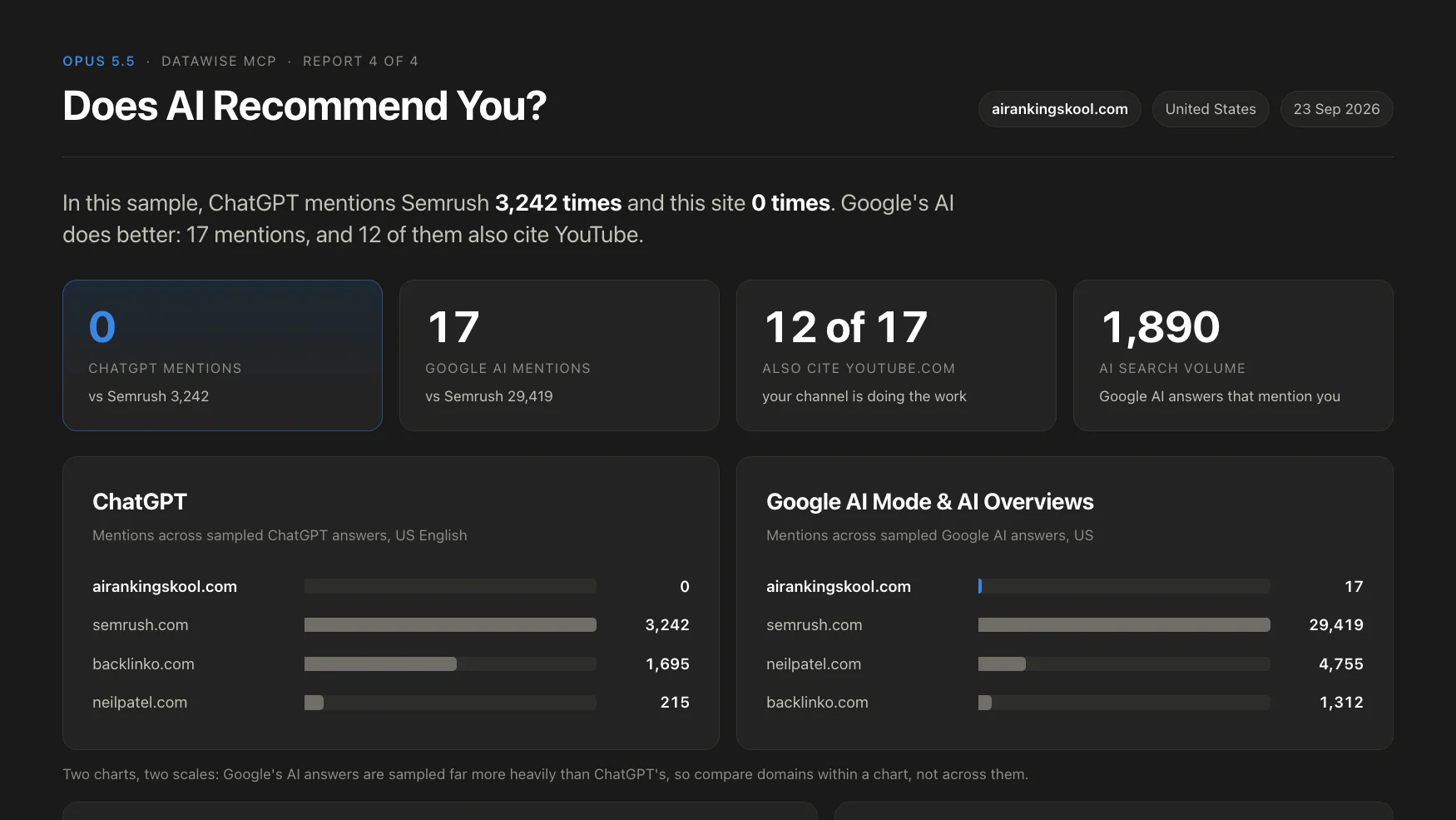
Example output of Prompt 4 on airankingskool.com, using DataWise data retrieved on September 23, 2026.
For more on reading these numbers, see how to know if ChatGPT and Perplexity cite your website.
How do you get better results from these prompts?
Run them inside a Claude Project that already holds your business context: what you sell, who you sell to, your locations and your main services. Even the smartest model gives better SEO recommendations when it understands the business behind the website.
I keep a short site brief in the project with all of that information. Real data from the connector plus real business context from the project is the combination that makes the recommendations specific instead of generic.
Watch the full walkthrough

Nicolas Gorrono
Founder of DataWise SEO and the AI Ranking community. Writing about SEO, AI search, and data-driven optimization.
Put these insights into action
Join the AI Ranking community to get unlimited DataWise access, included with your membership. 7-day risk-free trial.
Join AI Ranking